
What keeps a business meeting on track when the audio cuts out, a screen will not connect, or remote attendees cannot hear the room? A dependable conferencing center needs more than cameras and displays. Its room AV, cabling, network, and IT support must work together so employees can start meetings without troubleshooting technology.
Choosing components can feel complicated when a project touches several business systems. The right setup depends on how your team meets, shares content, and connects with remote participants. Planning those needs together helps reduce avoidable connection issues and makes the room easier to use every day.
This guide covers the practical technology behind a reliable conferencing space and how to plan AV and network requirements around your meeting formats. You will also learn how coordinated installation and ongoing IT support can help keep systems working together. SpaceCenter Systems supports Houston-area organizations with AV installation, structured cabling, networking, and IT support for business technology projects.
Key Takeaways
- Match room technology to how your team presents, collaborates, and includes remote participants.
- Plan how AV components and network infrastructure will carry sound, video, and shared content.
- Choose a conferencing center setup based on meeting purpose, participant interaction, and network needs.
- Plan installation in stages, from assessing the room and cabling routes to testing the finished setup.
- Coordinate AV, structured cabling, networking, and IT support to make the meeting space practical for daily use.
What Does a Business Conferencing Center Need to Work Well?
A business conferencing center is a meeting space equipped with coordinated communication technology. It brings room audio and video, network connectivity, and meeting software together so people onsite and remote participants can communicate and share information.
That is different from a conference venue, which provides space for events, or an online meeting platform, which hosts virtual meetings through software. A business may use an ordinary meeting room as its conferencing space. The Conference hall overview provides context on physical meeting spaces, but a reliable business setup also depends on how the technology supports everyday work.
Room AV captures and presents sound and images, while conferencing software connects participants and manages the online meeting. Both are needed for hybrid discussions, but they serve different roles. The room’s purpose, expected participation, and meeting habits determine what the technology needs to do.
Which meetings should the room support?
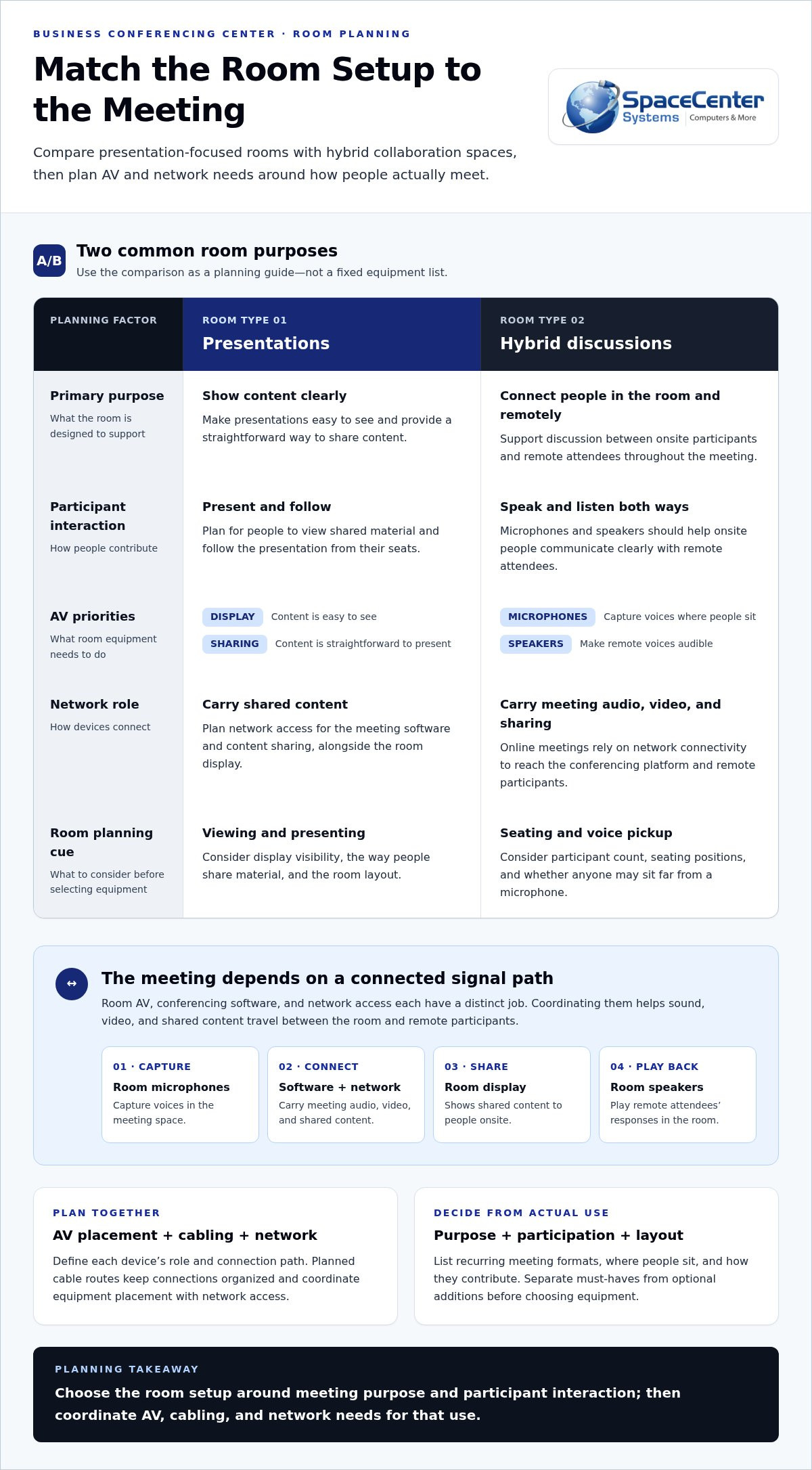
Start with recurring uses such as team meetings, client presentations, and hybrid discussions. A presentation room may need a display that is easy to see and a straightforward way to share content. A hybrid meeting also needs microphones and speakers that help people onsite communicate clearly with remote attendees.
Participant count and room layout matter. A long table, for example, may leave some speakers farther from a microphone than a compact seating arrangement. List common meeting formats, where people sit, and how they contribute before selecting equipment. This helps align AV planning with actual work instead of adding features the team rarely uses.
What belongs in a conferencing center technology plan?
Build the plan around essential meeting tasks: showing content, capturing voices, playing remote audio, running conferencing software, and connecting to the network. Displays, microphones, speakers, software, and network access should work as one system, not as disconnected devices that leave users sorting out connection problems at the start of each meeting.
Separate must-haves from optional additions. A room used mainly for presentations may not need the same capabilities as one used for frequent hybrid discussions. Decide how people will join, share content, and hear one another, then map those needs to equipment and infrastructure. Coordinated Houston-area technology services can bring AV, cabling, and networking into the plan for the room’s intended use.
How Do Conference Room AV and Network Systems Work Together?
A successful meeting depends on a clear signal path. A participant joins through conferencing software on a laptop or room system. Room microphones capture their voice, and the audio system and network carry it to remote attendees. Their responses return through the room speakers. Shared content travels over the network to the meeting platform and appears on the room display. Each component has a distinct job, but the meeting feels seamless only when they work together.
How do microphones, speakers, and displays support a meeting?
Room layout guides equipment placement. Microphones should capture participants where they sit, while speakers need to make remote voices audible throughout the meeting area. The display should be easy for in-room participants to view, whether they are following a presentation or looking at remote attendees. AV planning references such as AVIXA industry standards can help teams consider image visibility and audio coverage.
Why do conferencing rooms depend on network infrastructure?
Online meeting audio, video, and screen sharing rely on network connectivity to reach the conferencing platform and remote participants. An unstable or poorly planned connection can lead to delayed content, interrupted audio, or difficult-to-follow video. Network planning should account for the meeting room’s connection needs alongside the organization’s other systems.
Structured cabling provides organized physical connections between room equipment and the business network. Planning cable routes during installation keeps connections orderly and makes it easier to identify how devices are linked. It also coordinates AV placement with network access, rather than leaving equipment dependent on improvised connections. Businesses can include structured cabling in their room infrastructure plan.
For example, when a team member shares a presentation, the laptop sends content through the meeting software and network. The platform delivers it to remote attendees, while the room display shows it to people onsite. At the same time, microphones and speakers carry the discussion in both directions. If a connection in that chain is overlooked, participants may need to pause and troubleshoot instead of focusing on the meeting.
Planning AV installation, network access, and cabling together gives each device a defined role and connection path. For a conferencing center, that coordination can make routine meetings easier to start and manage. Explore audio visual installation services to see how room technology can be planned around business use.
Which Conferencing Center Setup Fits Your Business Meetings?
The right setup depends on what happens in the room. A space used mainly for presentations has different priorities from one where onsite and remote participants collaborate throughout the meeting. Use the comparison below to connect room purpose with interaction, AV, and network needs. Treat it as a planning guide, not a fixed equipment list: the room layout and your team’s working habits will shape the final choices.
| Room purpose | Participant interaction | AV needs | Network considerations |
|---|---|---|---|
| Presentations | One presenter shares information with an in-room audience. | Clearly visible display, presenter audio, and simple content sharing. | Reliable access for presentation files, online content, and any remote connection. |
| Hybrid meetings | People in the room and remote attendees discuss and share ideas. | Room audio that captures onsite speakers, speakers for remote voices, and a display for participants and shared content. | Stable connectivity for meeting audio, video, and screen sharing. |
| Multi-participant collaboration | Several people contribute from the room, sometimes alongside remote attendees. | Audio coverage suited to where participants sit, plus displays that support discussion and shared materials. | Network access planned for the meeting platform and connected room devices. |
What does a presentation-focused room require?
For a presentation room, start with sightlines. Participants should be able to view the material from their seats, and the presenter should be heard throughout the room. Provide a straightforward way to connect a presenting device and share content to reduce setup friction. Table placement, seating direction, and cable paths all affect where displays and connections should go.
What changes for hybrid and multi-participant meetings?
Hybrid rooms must serve both sides of the conversation. Remote participants need to hear people in the room and see shared materials, while onsite attendees need to follow remote speakers and join the discussion naturally. In a multi-participant space, consider where people speak from and whether the layout makes it easy to see one another as well as the display. Business phone systems can support broader organizational communication alongside meeting-room AV.
A practical conferencing center plan starts with recurring meeting workflows, then matches AV and network choices to the room. A smaller discussion space may need a different arrangement from a room used for frequent presentations. SpaceCenter Systems provides audio visual installation services to help businesses coordinate room technology around how teams meet.
How to Plan a Houston Conferencing Center Installation
A well-planned installation starts with how the room needs to function, then connects that purpose to the space, cabling, network, and AV work. For Houston businesses, considering these elements together helps define a practical scope and reduces the risk of room changes or disconnected project work causing avoidable delays.
What should a room assessment cover?
Document recurring meeting formats, room dimensions, seating arrangement, existing technology, and available connections. Note where participants sit, where presenters work, and where displays and other equipment could go. Review network access, power, potential cabling routes, and business operations that could affect installation.
Use those findings to define the project scope instead of assuming a standard equipment package. A room with existing network connections may have different infrastructure needs from one that requires new cable routes. An assessment can also show how the AV layout and network plan need to support the room’s day-to-day use.
How can installation and testing reduce meeting-day issues?
Once the scope is clear, coordinate cabling, network connectivity, AV installation, and the way employees will use the room. This helps ensure equipment has a planned connection path and users can follow a straightforward meeting workflow. SpaceCenter Systems supports organizations through Houston-area technology services and AV installation services.
Before regular use, test typical activities from start to finish. Join a meeting, check that people in the room can be heard remotely, confirm remote audio plays through the room speakers, and try a presentation with screen sharing. Testing the usual workflow can reveal connection or usability issues while there is still time to address them.
As business needs change, ongoing network oversight can help identify connectivity concerns. Network monitoring support can complement a coordinated room setup. Assessment, installation, and testing give a conferencing center a clear path from project plan to everyday use.
Keep Your Conferencing Center Reliable with Coordinated Local Support
A conferencing center stays useful when its room technology and supporting infrastructure are treated as connected parts of the business environment. AV, structured cabling, networking, and IT support all play a role. When staff know where to turn for an issue, they can spend less time tracing which system is responsible and more time getting the meeting back on track. Coordinated support can reduce avoidable disruptions, although no technology setup can prevent every issue.
What should ongoing conferencing room support include?
Support planning should account for the room’s AV connections, network access, and the meeting software employees use. If remote participants cannot hear the room, for example, the cause could involve microphone connections, audio settings, or network performance. A clear support process helps staff identify the issue and route it to the right technical area without unnecessary handoffs.
Set the support scope around how often the room is used and how it connects with broader business systems. A space used for client presentations may have different priorities from one used throughout the day for hybrid collaboration. Clear room documentation and support ownership help teams handle routine questions consistently.
How can Houston businesses take the next step?
Start with a concise picture of the room: its purpose, who uses it, current AV and network infrastructure, and the issues employees encounter. Note recurring meeting formats and any business operations that could affect installation or support. These details provide a practical foundation for discussing assessment needs and project scope.
SpaceCenter Systems supports Houston-area organizations with AV installation, cabling, networking, and IT support. Businesses in Pearland, Houston, Sugar Land, League City, Pasadena, and Friendswood can explore Houston business technology support or discuss their meeting space and technology priorities.
Build a Meeting Space Your Team Can Rely On
A dependable conferencing center starts with the way your team meets. Match the room’s AV and network requirements to its purpose, then coordinate displays, audio, cabling, connectivity, and user workflows in one plan. Testing familiar meeting tasks before regular use can help uncover issues early.
Ongoing support matters, too. Clear ownership across AV, networking, and IT gives staff a practical path when something needs attention. SpaceCenter Systems supports Houston-area organizations with AV, networking, structured cabling, and IT support.
With a thoughtful plan and local technology support, your meeting room can better serve the people who rely on it every day.
Frequently Asked Questions
What is a conferencing center?
A conferencing center is a physical business meeting space supported by coordinated communication technology. It may include room audio and video, displays, network connections, and software that connects remote participants. Unlike a conference venue, it is not necessarily a public event space. It is also different from an online meeting platform, which provides software but not the room equipment and infrastructure employees use onsite.
What equipment does a business conferencing center need?
A business conferencing center typically needs a display, microphones, speakers, conferencing software, and dependable network connectivity. The right combination depends on how the room is used. A presentation space may prioritize screen visibility and content sharing, while a hybrid room also needs to capture in-room voices and play remote participants’ audio. Plan how each component connects so staff can use the room as one system.
How do you set up a conferencing center for hybrid meetings?
Plan a hybrid room so onsite and remote participants can both see shared content and take part in the conversation. Consider where people sit, how room audio will capture their voices, where remote audio will play, and how the display will show participants or presentations. Then coordinate AV, network access, cabling, and meeting software. Test a typical call and screen-sharing workflow before the room enters regular use.
Can a conferencing center use Microsoft Teams or another meeting platform?
Yes. A physical meeting room can be planned around the meeting platform an organization uses, including Microsoft Teams or another service. The room’s microphones, speakers, displays, network connection, and participant devices all need to support the intended workflow. Decide how employees will join meetings and share content, then test those steps with the platform. Room equipment and software work together, but they serve different functions.
How important is network connectivity for a conference room?
Network connectivity is essential for meetings that use online audio, video, or screen sharing. It carries meeting information between the room, the conferencing platform, and remote participants. An unstable or poorly planned connection can interfere with those activities. Include the room’s network access and cabling routes in installation planning, and consider how meeting traffic fits alongside the organization’s other network needs.
What should a business assess before installing conference room AV?
Assess the room’s purpose, recurring meeting formats, typical users, seating layout, and existing technology before planning AV. Review available network connections, cabling routes, power access, and possible locations for displays and other equipment. Note any business operations that could affect the project. These findings help shape a practical scope around the room instead of relying on assumed equipment needs or a one-size-fits-all design.
Who can help install conferencing center technology in Houston?
SpaceCenter Systems provides AV installation, structured cabling, networking, and IT support for Houston-area organizations. The company serves businesses in Pearland and communities including Houston, Sugar Land, League City, Pasadena, and Friendswood. Teams can discuss the room’s purpose, existing infrastructure, and meeting challenges as part of project planning. Learn about audio visual installation services or schedule a consultation.