
Did you know that 61% of small and medium-sized businesses experienced a breach in the past year? For a local firm, a cyberattack isn’t just a technical glitch; it’s a direct threat to your reputation and your bottom line. If you’re currently facing a system slowdown or a suspicious popup, you’re likely searching for professional business malware removal Houston to protect your assets before the damage spreads. At SpaceCenter Systems, we’ve helped local companies navigate these challenges since 1995, and we know the anxiety that comes with wondering if a consumer antivirus tool is sufficient for a corporate network.
We understand the pressure you’re under, especially for healthcare practices facing strict regulatory compliance and Texas laws like SB 2610. You need more than a quick fix; you need a strategy that ensures complete recovery. In this guide, you’ll learn how to safely identify, contain, and eliminate malicious software from your network to minimize costly downtime. We’ll provide a clear, structured plan to isolate infected systems and erase threats entirely. By the end, you’ll know exactly how to transition from reactive emergency repairs to the proactive managed security your business deserves.
Key Takeaways
- Distinguish between simple consumer viruses and complex business-grade infections that specifically target your server resources and sensitive company data.
- Master the containment protocols necessary to stop lateral movement across your network while preserving critical evidence for technical forensics.
- Evaluate the limitations of automated software compared to professional business malware removal Houston services for detecting advanced persistent threats.
- Implement a structured recovery plan to safely restore your systems to a secure operational baseline without risking immediate re-infection.
- Shift from reactive emergency fixes to proactive network monitoring to identify malicious behavior before it escalates into a full-scale breach.
Identifying the Critical Signs of Business Malware Infections
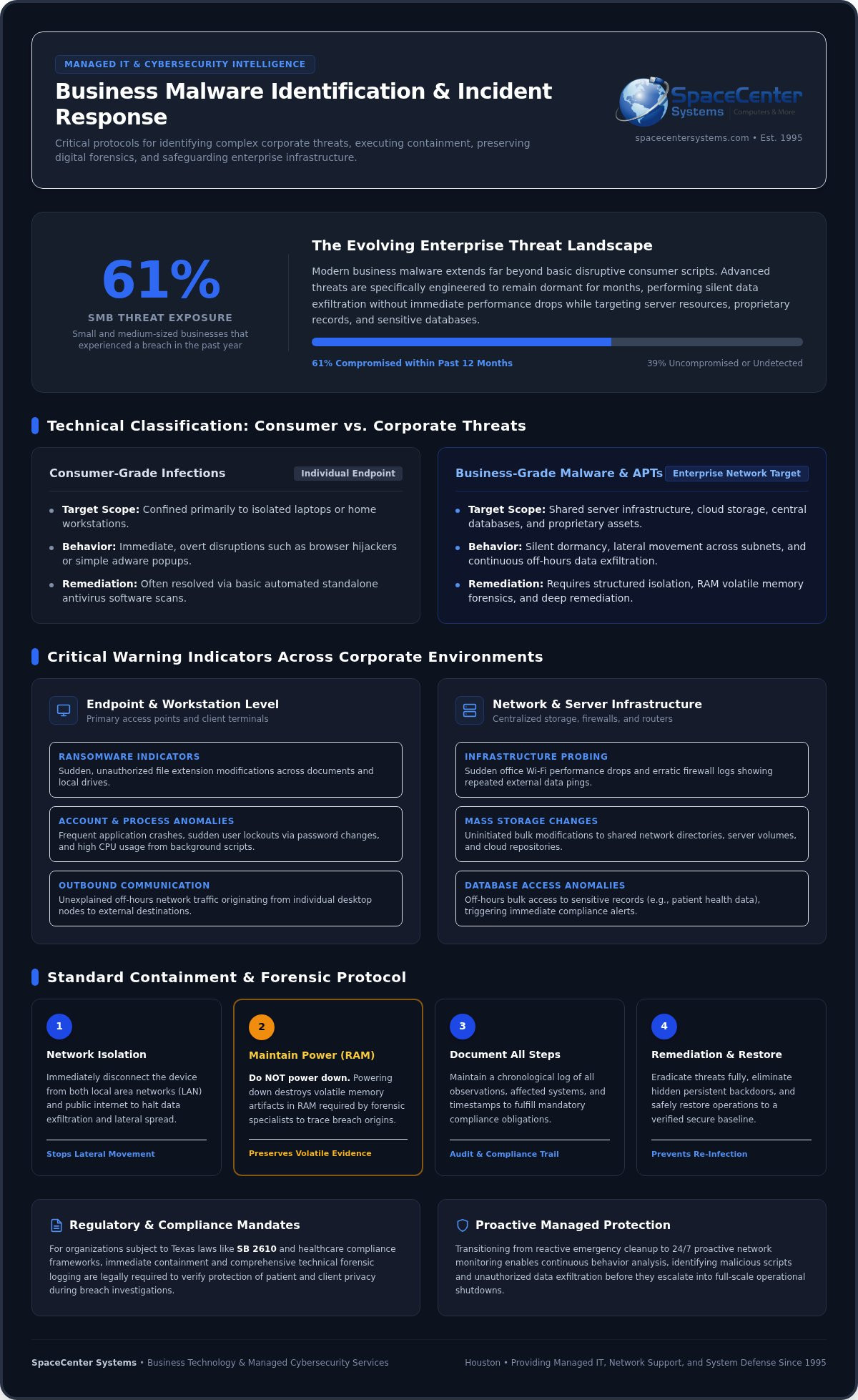
Business malware is much more than a simple computer virus. It is malicious code specifically engineered to disrupt operations, cause damage, or gain unauthorized access to protected corporate networks. While a consumer virus might only affect a single laptop, business-grade infections target shared server resources and proprietary data to maximize their impact. For those looking for a comprehensive overview of malware, it’s clear that modern threats have evolved far beyond basic disruptive scripts. Professionals providing business malware removal Houston services often see infections that remain dormant for months, performing silent data exfiltration without causing any immediate performance drops.
Relying on a basic system health dashboard isn’t always enough. You need to look for subtle anomalies that indicate a breach is in progress. If your team notices unexplained network slowdowns, it might not be a provider issue; it could be a sign of a compromised environment. SpaceCenter Systems provides specialized support for businesses in Houston, helping owners identify these red flags before they lead to permanent data loss. Since 61% of small and medium-sized businesses experienced a breach in the past year, recognizing these signs early is a critical survival skill for local firms.
Common Symptoms Across Corporate Workstations
Workstations are often the initial entry point for attackers. You should watch for these specific indicators at the endpoint level:
- Frequent application crashes or unauthorized password changes that lock employees out of their accounts.
- Sudden modifications to file extensions, such as documents changing to unrecognizable formats, which often signal the start of a ransomware event.
- Unusual outbound network traffic during off-hours originating from a specific office desktop, suggesting data is being sent to an external server.
Unauthorized background processes that consume high CPU levels usually indicate that a compromised system endpoint is running hidden malicious scripts. Securing these endpoints is the first step in effective business malware removal Houston, preventing a single laptop from compromising the entire building.
Network-Wide Indicators and Server Anomalies
Network-level signs are often more critical than individual PC issues. A sudden drop in office Wi-Fi performance or erratic firewall logs indicating repeated external data pings suggests that your infrastructure is under active probe. On your local servers or cloud storage platforms, look for mass modifications to shared files that your staff didn’t initiate. This is especially vital for healthcare offices, where database access patterns must be monitored to prevent compliance violations. If you see records being accessed in bulk outside of normal patient care hours, it’s time to trigger your incident response plan immediately to protect patient privacy and maintain regulatory standing.
Immediate Containment Steps After a Cyber Attack
When an infection occurs, containment is the single most critical step to prevent lateral movement across your business network. Attackers design modern malware to spread quickly from a single computer to your main servers. Your immediate response determines whether you face a minor cleanup or a catastrophic operational shutdown. Many business owners instinctively want to turn off a machine completely when they see an issue. However, powering down can destroy volatile memory evidence needed for advanced forensics. Keeping the system running but completely isolated allows professionals to extract artifacts from the random-access memory (RAM) to understand how the breach occurred.
Isolating the affected hardware from both your local area network (LAN) and the public internet stops data exfiltration immediately. This rapid isolation protects your remaining infrastructure while you coordinate with a team experienced in business malware removal Houston. You must also document every action taken during this initial discovery phase. Keeping a detailed log is necessary for compliance tracking, helping you prove to regulators that you took responsible steps to limit the impact of the incident.
Isolating Infected Devices from the Network
To stop the spread of malicious code, you must sever all network connections immediately. Unplug the physical Ethernet cable from the back of the compromised computer. Next, disable the Wi-Fi adapter through the operating system settings to ensure it doesn’t jump to an open office network. If you manage local servers, segment them immediately to protect your intact backups from cross-infection. Implementing a modern network security strategy ensures that if one zone falls, your critical infrastructure remains safe. Following the protocols in the official #StopRansomware Guide can help you establish these boundaries under pressure.
Securing Business Accounts and Credentials
Malware frequently harvests credentials to deepen its access. You must mandate an immediate company-wide password reset, but ensure your team performs this from an uninfected administrative device. Take these steps immediately to secure your environment:
- Temporarily disable compromised user accounts to block further access.
- Revoke all active remote access sessions, including Virtual Private Network (VPN) connections.
- Enforce multi-factor authentication (MFA) across all cloud applications to block persistent threat actors trying to re-enter.
If you need immediate assistance during an active incident, you can contact our support team to help secure your system credentials and isolate active threats.
Automated Software vs. Professional Business Malware Removal in Houston
Relying on a standard antivirus program for a corporate network is like putting a residential padlock on a bank vault. These tools offer basic protection, but they aren’t designed to handle the complex, multi-stage attacks targeting local firms. Professional business malware removal Houston involves more than just clicking a scan button; it requires active threat hunting to find hidden backdoors. When you rely on unverified internal fixes, you risk the hidden cost of extended downtime. Research from 2026 indicates that the average cost of a data breach for a small business is $3.31 million. That’s a price tag no local business owner wants to face.
The Limits of Off-the-Shelf Scanning Tools
Off-the-shelf software primarily uses signature-based detection, which works well for known viruses but fails against zero-day exploits and polymorphic malware. These advanced strains change their underlying code to evade detection by standard utilities. This creates a dangerous false sense of security where an automated tool reports a clean system while malicious processes continue in the background. Modern malware often leaves registry keys intact to trigger re-infection even after the main executable is deleted. Without manual verification, you’re simply waiting for the next crash to happen.
The Value of Expert Technical Remediation
Expert remediation goes beyond surface-level cleaning. Technicians use specialized rootkit detection and forensic log analysis to track every move an attacker made. Following CISA’s guide to remediating malicious activity ensures that every trace of the threat is accounted for. A crucial part of this process is validating that your backup data remains clean before you initiate a full system restore. If you restore an infected backup, you’re back at square one. Integrating managed IT services provides the ongoing oversight needed to catch these errors before they disrupt your operations. SpaceCenter Systems has provided this level of seasoned, local authority to the Greater Houston area since 1995, offering on-site technical support that a faceless software company can’t match.
A Step-by-Step Guide to Business Malware Remediation and Recovery
Recovering from a cyberattack requires a structured process to move your company from an active infection state to a fully verified, secure operational baseline. You cannot afford to guess if a threat is gone. True remediation involves preparing a clean environment and utilizing safe, offline system booting to ensure malicious code cannot intercept the cleaning process. Verified backup systems are then deployed to overwrite compromised sectors completely. This method ensures you replace damaged files without introducing legacy vulnerabilities that attackers could exploit later. Before returning any device to the main production network, post-removal validation testing must be completed to confirm total eradication.
Eradication and Deep System Cleaning
To clean a system thoroughly, you must bypass the compromised operating system entirely. Technicians utilize specialized bootable recovery media to scan the underlying infrastructure outside the infected environment. This prevents the malware from hiding itself or blocking the removal tools. During this stage, the team performs several manual deep-cleaning tasks:
- Purging malicious scheduled tasks that are set to re-trigger the infection at a specific time.
- Deleting corrupt registry entries that point to malicious executables.
- Clearing hidden temporary directories where attackers frequently store their payloads.
Local IT teams verify system integrity for businesses operating across Houston, ensuring that every workstation meets rigorous security standards before it reconnects to the local network.
Restoring Operations from Secure Backups
Once the environment is clean, the restoration phase begins. You must verify the integrity of your historical restore points to avoid re-introducing hidden ransomware payloads that might have been backed up before the attack became visible. Depending on your infrastructure type, you will execute either a controlled bare-metal restore or a cloud-based recovery to bring your systems back online. Implementing a resilient data strategy through a robust business continuity disaster recovery plan ensures your operations remain stable even under severe technical stress. This structured approach is what makes professional business malware removal Houston services an essential asset for local commercial operations.
Request a Quote for Emergency IT Support
Preventing Re-Infection with Managed Cybersecurity and Network Monitoring
Completing a successful business malware removal Houston is only the first step toward long-term stability. If you return to the same reactive break-fix model that allowed the infection to occur, you remain vulnerable to the next wave of attacks. Shifting to proactive managed IT services reduces your operational risk by addressing vulnerabilities before they are exploited. Modern threats move too fast for manual checks; you need a system that works while your team sleeps. By closing security gaps and monitoring traffic patterns, you transform your network from a target into a fortress.
A major part of this defense involves regular software patching and automated vulnerability assessments. Since exploiting software vulnerabilities is now a top initial breach method, keeping your systems updated is a non-negotiable requirement. These automated tools identify outdated code across your infrastructure, ensuring that your servers and workstations aren’t left open to known exploits. When combined with employee security awareness training, you create a vital defensive layer against the phishing and social engineering tactics that account for a large portion of modern breaches.
Implementing 24/7 Network Monitoring
Proactive network monitoring allows you to see exactly what is happening across your infrastructure at any moment. SpaceCenter Systems utilizes centralized system health dashboards to track anomalous bandwidth usage and unauthorized access attempts instantly. Unlike classic antivirus programs that only react to known files, automated endpoint detection and response (EDR) solutions analyze behavior. If a process starts behaving like ransomware, the system can isolate the threat before it escalates into a full-scale breach. This proactive approach serves as the ultimate shield against the high cost of operational downtime, ensuring your business stays productive and secure.
Establishing a Resilient Security Culture
Technology alone isn’t enough to stop every threat. You must establish a resilient security culture through routine IT assessments that identify outdated hardware, weak credentials, and unpatched operating systems. Developing a formal incident response plan ensures that your local staff knows exactly how to handle future cyber threats without panic. This preparation is especially critical for Houston healthcare practices that must maintain strict compliance standards. We’ve grown alongside the regional economy since 1995, and we understand the specific challenges facing local business owners.
Secure your business infrastructure today by scheduling a comprehensive 90-Day IT Needs Assessment Program with SpaceCenter Systems.
Securing Your Business Future in Houston
Protecting your company from modern cyber threats requires a shift from reactive emergency fixes to a strategic, proactive stance. Professional business malware removal Houston ensures that every hidden backdoor is closed and that your recovery environment is truly secure before you resume operations. Relying on consumer-grade tools leaves your server resources and sensitive data at risk, potentially leading to devastating operational downtime. You need a partner who understands the high stakes of corporate data integrity.
SpaceCenter Systems brings over 25 years of local Houston IT expertise to every challenge. We specialize in providing comprehensive cybersecurity and proactive network monitoring for healthcare providers, property management firms, and small businesses across the region. Our team is dedicated to providing the stability and support you need to focus on your core business goals. You don’t have to face these technical complexities alone.
Schedule a Professional Cybersecurity Consultation with SpaceCenter Systems
We’re here to help you build a resilient infrastructure that stands the test of time. Let’s work together to keep your Houston business safe, productive, and ahead of the next threat.
Frequently Asked Questions
What is the difference between consumer virus removal and business malware remediation?
Consumer removal focuses on a single device and basic cleanup. Business remediation addresses the entire network infrastructure. It involves hunting for lateral movement, securing shared server resources, and ensuring regulatory compliance like HIPAA. While a consumer tool might delete a file, professional remediation validates that backdoors are closed and backups are clean. This comprehensive approach prevents the high cost of operational downtime for local companies.
Should I shut down my business server immediately if I suspect a malware infection?
You shouldn’t power down the server immediately because doing so wipes volatile memory evidence. This data is critical for forensic analysis to determine how the breach started. Instead, disconnect the server from the internet and local network by unplugging Ethernet cables. This isolates the threat and stops data exfiltration while preserving the system state for a professional team to analyze and clean safely.
Can standard free antivirus software completely clean a corporate network?
Standard free tools aren’t sufficient for a corporate environment because they lack the ability to detect advanced persistent threats. These tools usually rely on known signatures and miss zero-day exploits or fileless malware hiding in system memory. Professional business malware removal Houston services utilize behavior-based detection and manual log analysis. This ensures that hidden registry keys and scheduled tasks are purged; automated free tools frequently overlook these critical components.
How long does the professional business malware removal process typically take?
The duration depends on the infection’s complexity and the number of endpoints involved. A single workstation might be secured in a few hours, but a full network remediation can take several days. The process includes deep scanning, manual registry cleaning, and verifying backup integrity. We focus on a thorough restoration to ensure the threat is entirely eradicated before you return to a full production environment, minimizing long-term risk.
How can a Houston business verify that their older backups are not infected with malware?
Verification requires scanning backups in a sandbox or isolated environment before restoration. Technicians look for dormant ransomware payloads or suspicious scripts that may have been backed up weeks before the attack was detected. Our team uses specialized tools to check file integrity and ensure you aren’t re-introducing a threat. This step is vital for businesses in Houston to maintain operational continuity and avoid immediate re-infection.
What industries in the Houston area face the highest risk from silent malware infections?
Healthcare offices, property management firms, and legal practices face the highest risk due to the sensitive nature of their data. Attackers target these sectors because they often handle protected health information or financial records. Silent infections allow criminals to exfiltrate data for months without detection. Professional business malware removal Houston is essential for these local organizations to satisfy regulatory requirements and protect their professional reputation within the community.
How does proactive network monitoring prevent malware from spreading laterally across an office?
Proactive monitoring uses real-time dashboards to identify unusual traffic patterns, such as a workstation suddenly attempting to access a restricted server. By detecting these anomalies instantly, the system can automatically trigger an isolation protocol. This stops the infection from moving laterally across your structured cabling. It transitions your defense from reactive emergency fixes to a managed security model that identifies malicious behavior before it becomes a full-scale crisis.