

What if a business phone outage isn’t a phone-system problem at all? A dropped call or silent handset can point to an issue with the network, internet connection, or phone service, leaving staff unsure where to turn. Dependable business phone system support Houston businesses can rely on connects those pieces and helps keep customer and team communications moving.
When calls stop working properly, you need clear answers, not a maze of technical terms or a blame game between providers. Good support identifies where the problem may sit, explains the next steps in plain language, and coordinates phone and network troubleshooting when the systems overlap.
This guide explains what business phone support can cover, how VoIP phones connect to your network, and what details to gather before reporting an issue. You’ll also learn how a Houston-area technology partner can bring business phones, network support, and managed IT together, so your organization has a practical path for resolving disruptions and preparing for common problems.
Key Takeaways
- Reliable business phone system support should address phone service, devices, configuration, and connectivity.
- Understand how internal IT, phone-service providers, and integrated local IT support may divide troubleshooting and escalation.
- Use an incident checklist to record who is affected, describe symptoms, and check basic connections before reporting a problem.
- Recognize when a routine user question needs technical troubleshooting or coordination with the phone-service provider.
- See how a Houston-area technology partner can bring business phones, VoIP, network troubleshooting, and IT support together.
Why Houston Businesses Need Dependable Business Phone System Support
Business calls help customers reach the right person, let staff coordinate work, and keep everyday decisions moving. A phone system needs to do more than provide a dial tone. Call routing, transfers, voicemail, and connections between office phones all affect how smoothly people communicate.
A fault can affect one employee or disrupt communication across an office. If a customer’s call never reaches the intended team, staff may need to follow up through another channel. If an employee can’t transfer a caller, colleagues may have to stop what they’re doing to help. Reliable business phone system support Houston businesses can use helps identify what’s failing and where troubleshooting should begin.
How phone disruptions affect everyday business operations
A phone issue can add steps throughout the workday. A receptionist might have to take messages manually when transfers stop working. A property manager may miss a tenant’s call if a business line isn’t ringing as expected. These disruptions can slow coordination even when other business systems continue to operate.
A restart may temporarily restore service, but repeated faults call for a closer look. Record when the issue happens and whether it affects the same users or features each time. Those patterns can help support teams investigate whether the cause relates to a device, a setting, or a wider service problem.
Why a phone issue may be a network issue
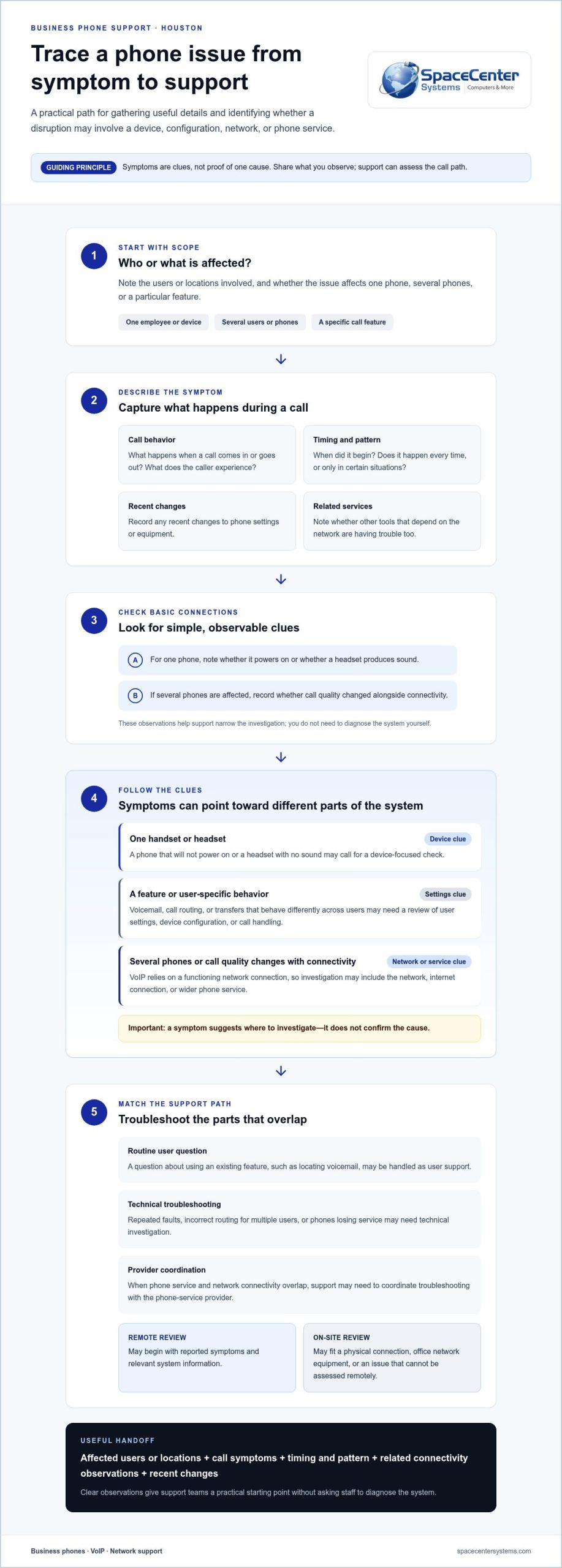
Some problems appear at the handset, such as one phone failing to power on or a headset producing no sound. Other signs, such as several phones losing service together or call quality changing alongside connectivity, may point to a network or internet issue. VoIP calls rely on a functioning network connection, so troubleshooting may need to include more than the phone itself.
Business phone systems can also include call-handling technology such as a Private Branch Exchange (PBX), which helps direct calls among lines and users. In systems that use internet-based calling, network conditions and phone configuration can both affect the experience. Symptoms are clues, not proof of one cause. Support should assess the path a call takes before settling on a fix.
This connected view matters for local organizations whose phones support customer service, staff coordination, or daily operations. A Houston-area technology partner can examine how business phones, VoIP, network connectivity, and broader IT support relate to one another. SpaceCenter Systems provides technology support for local organizations in Houston and Pearland, with services relevant to businesses in Sugar Land, League City, Pasadena, and Friendswood. Its Houston business technology services reflect that local focus.
When an issue occurs, record which users or locations are affected, what callers experience, and whether other network-dependent tools are also having trouble. This gives support teams a clearer starting point and helps distinguish an isolated device fault from a broader connectivity concern. You don’t need to diagnose the system yourself. The aim is to make the first troubleshooting steps informed and efficient.
What Business Phone System Support Covers Beyond the Handset
Business phone system support covers more than fixing a handset. It can include help with phone service, devices, user settings, call configuration, and the network connections that allow VoIP calls to work. Because these parts interact, useful troubleshooting starts with what the business is experiencing and how its phone service is set up.
Some requests are straightforward user questions. An employee may need help locating voicemail or using an existing call feature. Other issues, such as calls routing incorrectly for several users or phones losing service, may require technical investigation or coordination with the phone-service provider. The next step depends on the symptoms, how widespread they are, and which parts of the system are involved.
Phone service, devices, and call configuration
Support may address phone setup, voicemail access, call routing, and transfer behavior. If a call feature works for one employee but not another, the difference could involve a user setting or device configuration. If the same behavior affects multiple users, the issue may require a broader review of call handling. These are possibilities to investigate, not assumptions about the cause.
Useful details narrow the starting point: note which users are affected, what happens when a call comes in or goes out, and whether the problem occurs every time or only in certain situations. Include when it began and any recent changes to settings or equipment. Clear observations help support staff focus on the relevant part of the setup and avoid repeating basic checks.
Network connectivity and remote or on-site troubleshooting
VoIP relies on a working network connection, so network conditions can affect call quality or availability. A support team may begin remotely by reviewing reported symptoms and relevant system information. If signs point to a physical connection, office network equipment, or an issue that can’t be assessed remotely, an on-site review may be more appropriate. The troubleshooting method should fit the problem.
For businesses that need ongoing visibility into network health, network monitoring can provide useful context when users report call issues. Monitoring doesn’t replace troubleshooting, but it can help IT staff identify connectivity patterns for investigation.
Support channels can work together: employees describe what they’re seeing, technical staff investigate devices and connectivity, and the phone-service provider may address service-side issues. On-site and remote IT support gives organizations a way to handle issues through the channel that fits the symptoms and setup.
For a Houston business, business phone system support Houston should make the process easier to follow, even when the root cause isn’t obvious at first. A clear record of symptoms, affected users, and call behavior helps connect the right people to the problem. It also separates routine user questions from technical issues that need deeper review or coordination.
Compare Business Phone Support Options Without Confusing Responsibilities
When a phone problem crosses service, devices, and network connectivity, it can be unclear who should take the lead. A simple responsibility map helps staff report the issue to the right team and gives everyone a clearer path for escalation. The division depends on the business’s phone setup, internal resources, and service arrangements, so the roles below are typical rather than universal.
| Support option | Typical focus | How an issue may move forward |
|---|---|---|
| Internal IT or office staff | Basic user guidance, checking device power and connections, identifying who is affected, and recording symptoms. | Escalate when the issue involves system settings, multiple users, network symptoms, or a service outside the team’s access. |
| Phone-service provider | Phone service and the features or platform included in its service arrangement. | Investigate a suspected service-side issue or a fault within the provider’s scope. Broader local network questions may need coordination with IT. |
| Integrated local IT support | Business phones and VoIP alongside network conditions, user devices, and related IT support. | Connect reported call symptoms with network troubleshooting and coordinate escalation when another party owns part of the service. |
What an internal team or phone-service provider may handle
An employee or internal IT contact can gather the first useful facts: which person or location is affected, what the caller experiences, and whether the issue occurs on one device or several. Staff can also check straightforward items, such as whether a phone has power and is connected. These checks help describe the problem; they don’t establish its cause.
The phone-service provider may handle faults within its platform or service. Responsibilities vary, so a network-related symptom may require a handoff or joint investigation rather than a quick resolution from one side alone.
When connected IT and phone support is useful
A shared view of phone and network conditions can reduce unnecessary back-and-forth. For example, if several users report call problems while other network-dependent services also behave differently, IT support can investigate connectivity while phone support examines service and call configuration. Clear notes about what each team checked make the handoff more useful.
SpaceCenter Systems supports business phones and VoIP alongside network troubleshooting and helpdesk services. This connected approach can bring communication and IT concerns into the same support conversation for Houston-area organizations. For a local view of how these services connect, review Houston-area IT support for business technology needs.
If you’re planning a new system rather than resolving an ongoing issue, focus first on how staff use the phones and what the system needs to support. For current problems, start with the symptoms and the teams responsible for each part of the setup. This gives business phone system support Houston organizations a practical framework for assigning ownership and moving troubleshooting forward.
A Practical Checklist for Reporting and Troubleshooting Phone Problems
A clear report helps support staff understand the issue without asking employees to guess at the technical cause. Use this checklist during an incident, follow your organization’s established procedures, and avoid changes that could make the problem harder to diagnose.
Information to gather before reporting an issue
Start with the scope and observable symptoms. Note whether the issue affects one person, a department, or the whole office. Describe what happens during a call, such as calls failing to connect, unclear audio, unexpected disconnections, or calls reaching the wrong destination. Record when the problem began and whether it is consistent or intermittent.
- Identify who is affected. List the users, departments, locations, and devices involved. Note whether nearby colleagues can make and receive calls normally.
- Record what happens. Describe the call behavior in plain language. Include whether the issue affects incoming calls, outgoing calls, transfers, or voicemail, if relevant.
- Check basic connections. Follow your internal process to verify the phone has power and its visible connections are in place. If your organization permits it, check whether the affected user can access other network-dependent work tools.
- Note known changes. Record any recent phone, network, or configuration changes only if you know they occurred. Don’t assume a change caused the fault.
- Report your findings. Share the affected users, devices, symptoms, start time, and checks completed with your designated support contact. Keep the report factual and include any error message the user can see.
How to handle a suspected office-wide outage
If several people lose phone service at once, establish whether the problem is limited to calls or whether network access is also affected. This distinction gives support a useful starting point, but it doesn’t prove the cause. Avoid changing shared phone settings, restarting network equipment, or disconnecting cables unless your internal procedure or support team directs you to do so.
For urgent business coordination, use an alternate communication method approved by your organization. Let affected staff know what’s been reported and where updates will be shared. Keep a simple timeline of when the issue began, what checks were made, and whether the symptoms changed. That record helps the team compare reports and avoid repeating steps without a clear reason.
This process makes a support request more actionable and helps business phone system support Houston teams separate user observations from technical conclusions. You don’t need to diagnose the fault. A precise description of its scope and behavior is enough to guide the next investigation.
SpaceCenter Systems provides business phone and IT support for organizations in Houston and Pearland, including businesses in Sugar Land, League City, Pasadena, and Friendswood. Explore business phone and IT support for your organization.
Houston Business Phone System Support from SpaceCenter Systems
Business phone issues don’t always stay within the phone system. A call-routing question may involve a user setting, while inconsistent call quality may also call for a look at network conditions. SpaceCenter Systems supports Houston-area organizations with business phones, VoIP, network troubleshooting, and IT support, bringing these connected needs into a practical local support conversation.
SpaceCenter Systems works with local organizations that rely on technology to serve customers and coordinate daily work. A healthcare office may depend on clear communication among staff, while a property management team may need its phone service to support tenant and vendor calls. Each environment has its own workflows, so useful support starts with understanding how the business communicates and what its current systems are intended to do.
Connect phone support with the rest of your business technology
Phone support can sit alongside helpdesk assistance and network troubleshooting. When a user reports a call problem, connected IT support can help determine whether the issue appears limited to the phone or may involve a broader technology concern. That context can make escalation clearer and reduce the chance of teams investigating the same issue without a shared understanding of what has already been checked.
For organizations that need ongoing support across their technology environment, managed IT services can connect day-to-day assistance with broader IT management. The practical process is to understand the reported issue, assess the systems involved, and identify the appropriate next step without assuming every phone fault has the same cause.
Plan a useful next step for your Houston office
A productive discussion begins with a clear picture of the current setup. Decision-makers can describe the phone service in use, how staff rely on calls, any recurring difficulties, and which teams or locations are affected. It also helps to identify existing support arrangements and note whether phone concerns have appeared alongside network or other IT issues.
An IT assessment can help organize those details into priorities for communications and technology support. It gives the business an opportunity to review how its needs fit together and where further attention may be useful. For Houston organizations considering business phone system support Houston, SpaceCenter Systems brings business phones, VoIP, network support, and IT experience into that conversation.
Make Your Communications Plan More Resilient
Use your next planning review to look beyond individual phone faults. Consider how customers reach your team, how staff coordinate if a primary line is unavailable, and who should receive reports when an issue crosses phone and network support. Clear internal ownership and an approved backup communication method can help employees respond calmly while technical troubleshooting gets underway.
A practical plan for business phone system support should reflect how the business actually communicates. Review recurring issues, note gaps in the current escalation process, and decide what information staff should capture during an incident. These steps give your team a stronger foundation for maintaining clear communication as needs change.
With a thoughtful plan and the right support structure, your team can move forward with greater confidence in its day-to-day communications.
Frequently Asked Questions
What does business phone system support include?
Business phone system support can cover service questions, user setup, call handling, and troubleshooting when something doesn’t work as expected. For example, a new employee may need a business phone configured to follow the office’s established call-handling process. Support can also help determine whether a problem relates to the phone service, device, or connected technology. The exact work depends on the business setup and support arrangements.
Can a network problem cause business phone issues?
Yes. VoIP calls use the business network, so a connectivity issue can affect call quality or availability. If calls become unclear while other internet-based work tools also have trouble, that can be useful context for troubleshooting. It doesn’t confirm the network is the cause, but it helps support staff investigate the relevant systems. Note whether the symptoms affect one user, several users, or a particular office area.
How do I report a business phone outage in Houston?
Use your organization’s established support channel and describe the operational impact, such as whether customers can reach the main line or staff can make outgoing calls. Follow internal procedures for urgent updates and use an approved alternate communication method if needed. For businesses in Houston, Pearland, Sugar Land, League City, Pasadena, or Friendswood, include the affected office or location to clarify the scope of the incident.
Is remote support enough to troubleshoot a business phone system?
Remote support may be appropriate when the issue can be investigated through available system information or guided checks. A problem involving a physical phone connection, office cabling, or network equipment may call for an on-site assessment instead. Symptoms and the business setup determine the right approach. Remote troubleshooting can still help clarify what needs attention when equipment later needs an in-person inspection.
How much does business phone system support cost in Houston?
There isn’t one price that applies to every business phone support need. The scope can depend on the existing setup, the users and locations involved, and whether the work concerns ongoing support or a specific troubleshooting project. A consultation can help define what should be reviewed and clarify the appropriate scope of work.
Can one IT provider support both business phones and the office network?
Yes. A provider with business phone, VoIP, and network support can consider how those systems interact during troubleshooting. For example, if several users report call problems after a network change, a connected support team can examine the timing and coordinate investigation across the relevant technology. SpaceCenter Systems provides business phone and IT support, helping organizations keep related support needs within the same conversation.
What information should I have ready before requesting phone support?
Along with the affected users and devices, provide a specific call example if possible: whether it was incoming or outgoing, the approximate time, and what the caller or employee experienced. Share the relevant extension or business line through your approved support channel, and note whether the issue is still happening. This gives the support team a concrete case to investigate rather than a general report that calls are not working.