

A reliable business network starts with a layout, not a cable roll. Planning ethernet cabling installation Friendswood businesses can depend on means mapping where devices are used, how staff rely on them, and where the network may need to grow.
Before installation, consider which cable category fits your equipment, where outlets will be most useful, and how the work can fit around daily operations. The right choices depend on your devices and network needs, not simply on choosing the newest cable available.
This guide explains how to plan a practical cabling layout, compare cable categories, and prepare for installation with less disruption. You’ll learn how to account for workstations, wireless access points, and other connected equipment while leaving room for future changes. SpaceCenter Systems provides structured cabling for Houston-area businesses, including in Friendswood. A clear plan gives your business a dependable foundation for network support and changing technology.
Key Takeaways
- Map workstations, access points, phones, and network equipment before deciding where cable outlets should go.
- Choose a cable category based on your equipment, network needs, and plans for future changes.
- For ethernet cabling installation Friendswood businesses can rely on, plan cable routes and endpoints around daily operations to help limit disruption.
- Clear labeling, organized routes, testing, and documentation make troubleshooting and future network changes easier.
- A well-planned installation gives your business a dependable foundation for network support and new technology.
What Ethernet cabling installation in Friendswood does for a business
Ethernet cabling provides the physical wired connections that link business devices to a network. In an office, healthcare setting, or other Friendswood workplace, those connections can support computers at staff workstations, printers, desk phones, wireless access points, and network equipment. A planned ethernet cabling installation Friendswood businesses can build on starts by identifying what needs a connection and where work happens.
Ethernet over twisted-pair cable is commonly used for these network links. The overview of Ethernet over twisted pair explains the cable type and related wiring approaches. For a business, the practical goal is to connect each device reliably while keeping cables organized and out of the way.
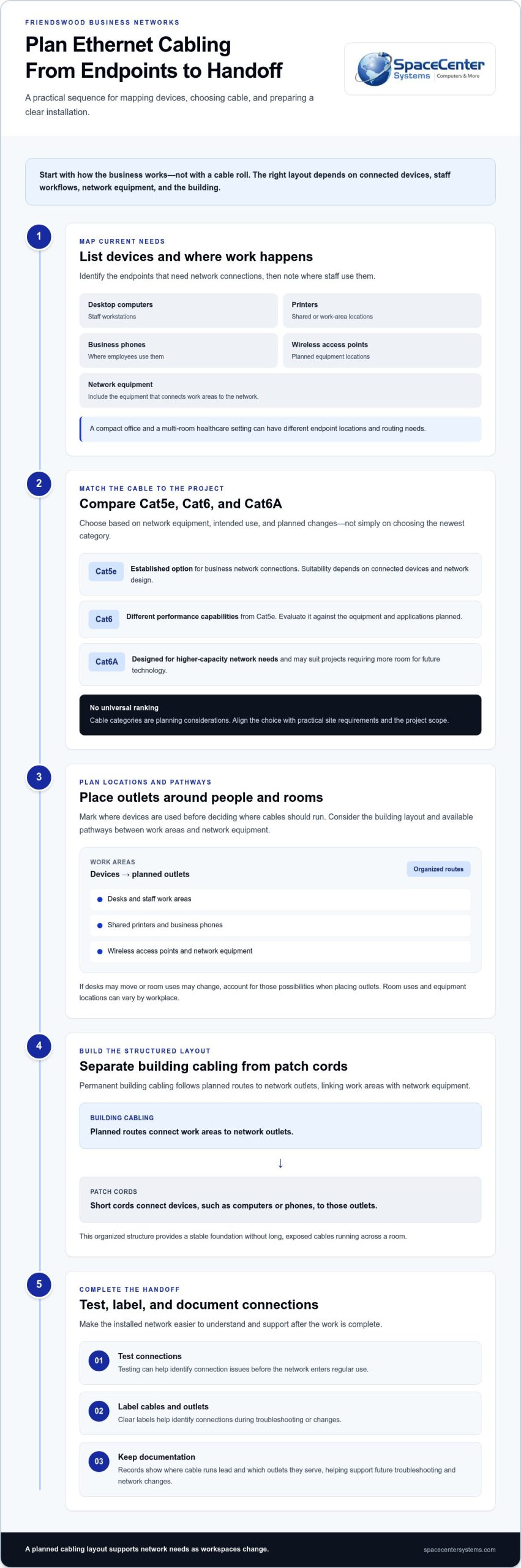
Permanent building cabling differs from a patch cord. Building cabling follows planned routes to network outlets, linking work areas to network equipment. Short patch cords then connect devices, such as computers or phones, to those outlets. This creates a stable foundation without long, exposed cables running across a room.
Which business devices commonly need Ethernet connections?
Common endpoints include desktop computers, printers, business phones, wireless access points, and network equipment. A healthcare office may need connections at reception, staff work areas, and equipment locations. Another business may have a different mix. The network design and workplace layout determine which devices need wired connections.
List endpoints before installation and note where staff use each device. This helps prevent improvised cable runs and puts outlets where employees need them.
How does structured cabling differ from a single network cable?
A single cable can connect one device, but structured cabling organizes connections across a workplace. Planned routes link work areas with network equipment, while labeled outlets and cables help staff or support teams identify connections during troubleshooting or changes. SpaceCenter Systems provides business cabling solutions as part of a dependable network foundation.
The layout should fit the business rather than follow a one-size-fits-all template. A compact office and a multi-room healthcare setting can have different endpoint locations and routing needs. Clear labels and documentation make the installed network easier to understand when devices move, teams change, or new connections are needed.
Plan Ethernet cabling in Friendswood around cable category, layout, and devices
Choose cable category and outlet locations as part of the same plan. The right setup depends on your network equipment, connected devices, staff workflows, and building layout. For ethernet cabling installation Friendswood businesses should first map current needs, then consider likely workspace changes before settling on routes.
How should a business think about Cat5e, Cat6, and Cat6A?
These categories have different capabilities, but a higher category is not automatically the right choice for every site. Match the cable to the network equipment and intended use, and consider how long the infrastructure should support planned changes.
- Cat5e: An established option for business network connections. Its suitability depends on connected devices and the network design.
- Cat6: Offers different performance capabilities from Cat5e. Evaluate it against the equipment and applications planned for the installation.
- Cat6A: Designed for higher-capacity network needs and may suit projects that require more room for future technology.
These are planning considerations, not a universal ranking. A site assessment can account for the project scope and help align cable selection with practical requirements rather than assumptions.
Where should Ethernet outlets and cable routes go?
Mark where devices are used before deciding where cable should run. Include desks, shared printers, business phones, wireless access points, and network equipment. In an office, that may mean planning around work areas and meeting spaces. A healthcare setting may have different room uses and equipment locations.
Then consider the building layout and available pathways between work areas and network equipment. Routes should suit the site and keep connections organized. If desks may move or room uses may change, account for those possibilities when placing outlets.
Reliable network planning also considers the equipment and support practices around the cabling. The FCC’s network reliability resources offer broader guidance for thinking about dependable communications systems. SpaceCenter Systems plans structured cabling around business layouts and network needs. Explore our business cabling solutions as you plan your project.
What makes Ethernet cabling reliable for Friendswood business networks?
A network cable does more than connect two endpoints. Cable routes, terminations, labels, and handoff information all affect how easy the cabling is to use and support. For a business in Friendswood, reliability means building infrastructure that remains understandable after installation, whether a team needs to troubleshoot a workstation connection or adapt a room for a new use.
Testing and documentation are important parts of completing the work. Testing can help identify connection issues before the network enters regular use. Records can show where cable runs lead and which outlets they serve. The right approach depends on the project, but these steps give business owners and support teams a clearer starting point when resolving a problem or making a change.
Why do labeling and documentation matter after installation?
Clear labels connect an outlet or cable run to its location, such as a reception desk, shared printer area, or staff office. Without them, tracing a connection can take longer, especially after furniture or equipment moves. Organized records make the infrastructure easier to maintain and help support teams work from a shared understanding of the network.
How does Power over Ethernet affect cabling plans?
Power over Ethernet (PoE) delivers data and power through a compatible Ethernet connection. It can support devices such as wireless access points and some business phones, reducing the need for a separate power connection at each device. The network equipment, cabling, and endpoint all need to suit the planned PoE use. Verify compatibility and power requirements for each project rather than assuming every connection can support every device.
A layout designed only around today’s endpoints may overlook how connected equipment will be powered and supported. Including PoE needs in the plan helps align cable routes and network equipment with the devices the business intends to use.
For ethernet cabling installation Friendswood businesses should treat installation quality as part of the wider network foundation, not simply as a way to connect outlets. SpaceCenter Systems provides structured cabling for business environments, with plans shaped around each site. Clear routes, useful labels, testing, and practical records make the infrastructure easier to support as workplace needs change.
What to expect during Ethernet cabling installation in Friendswood
A well-organized project follows a clear sequence: understand the business’s needs, assess the site, plan cable routes and endpoints, install the cabling, then test and review the connections. Details depend on building conditions, device locations, and project scope. An office with active workstations may need different coordination from a healthcare setting where staff rely on connected systems throughout the day.
Plan around business activity to help limit disruption. Identify areas where staff need uninterrupted access, discuss which spaces the installation affects, and coordinate access to work areas and network equipment. Clear communication helps employees know what to expect while the work is underway.
What should be mapped before installation begins?
A simple site checklist gives the project team a practical starting point. Record the locations of:
- Work areas, desks, and shared devices such as printers
- Network equipment and connections between equipment areas and workspaces
- Planned wireless access-point locations and business phones
- Spaces where cable routing may overlap with daily business activity
- Known office moves, layout changes, or network updates that could affect endpoint placement
These details help align proposed routes with how the business operates. They also let the team account for building pathways and site conditions before installation, rather than making avoidable decisions during the work.
What happens after cable installation?
After installation, connections can be checked against the planned endpoints. The project team can review which outlets serve which areas, address identified connection issues, and provide useful labels and handoff documentation. This gives the business a clear reference for network support, troubleshooting, and future changes.
SpaceCenter Systems provides structured cabling for business networks, with project planning shaped around the site and its requirements. A clear handoff connects the installation to ongoing network management.
For ethernet cabling installation Friendswood businesses can prepare by sharing an accurate device list, noting affected work areas, and identifying upcoming layout changes. This information helps the project team plan around real operating needs.
Request a structured cabling project quote
Plan your Friendswood Ethernet cabling project with local technology support
A practical cabling plan brings several decisions together: which devices need wired connections, where outlets should go, how cable routes fit the building, and which category suits the network’s needs. It should also account for planned office or technology changes. These choices help create infrastructure that supports daily operations without assuming every business needs the same layout.
Structured cabling is one part of a broader network environment. Clear records of cable routes and endpoints give support teams useful context when troubleshooting or updating connected equipment. For help with the wider network environment, explore SpaceCenter Systems’ business networking services.
When should a Friendswood business review its cabling?
Review the physical network layout during an office buildout, technology rollout, network upgrade, or workspace change. Recurring connectivity issues can also be a reason to examine cable routes, outlets, and connections. Cabling is only one part of network performance, so a review can help identify whether the physical layout needs attention without assuming it will resolve every network or Wi-Fi problem.
How can cabling planning connect with ongoing network support?
Labels and documentation help support teams understand where connections lead and which work areas they serve. That context can make troubleshooting and office changes more straightforward. SpaceCenter Systems provides structured cabling and related technology support for Houston-area businesses, including in Friendswood.
When planning wider infrastructure, consider how cabling choices fit the network equipment and connected devices your business relies on. A well-scoped project gives your team a clearer foundation for dependable operations and future technology changes.
Schedule a cabling project consultation
Build a Network Foundation Ready for What’s Next
A dependable cabling project starts with the way your business works. Map the devices and endpoints you need, choose cable to suit your network requirements, and plan routes that fit your building and daily operations. Clear labels, testing, and handoff records make the finished infrastructure easier to support as your workplace changes.
For ethernet cabling installation Friendswood businesses benefit from a plan tailored to their site, not a one-size-fits-all layout. SpaceCenter Systems provides structured cabling and low-voltage infrastructure for businesses in the Houston area, including Friendswood. The company’s work connects installation decisions with practical network support and future technology needs.
A well-planned cabling foundation helps your team support daily operations and approach future updates with a clearer picture of the network. SpaceCenter Systems works with businesses in Friendswood, Pearland, Houston, Sugar Land, League City, and Pasadena on practical technology projects.
Frequently Asked Questions
How long does Ethernet cabling installation take for a business?
Installation time depends on project scope and site conditions. The number and location of endpoints, building pathways, access to work areas, and coordination with business operations all affect the work. A project typically begins by identifying needs and assessing the site, then moves through route planning, installation, and connection checks. Sharing device locations and areas that need coordination helps shape a realistic project schedule.
What Ethernet cable category should a small business use?
The right category depends on network equipment, connected devices, intended use, and plans for future changes. Cat5e, Cat6, and Cat6A have different capabilities, so no single category suits every small business. Start by listing the devices and network requirements the cabling must support. A site-specific review can then align category selection with the project scope rather than the category name alone.
Can Ethernet cabling support business phones and wireless access points?
Yes. Ethernet connections can link business phones and wireless access points to a network. Some compatible devices can also receive power through Ethernet using Power over Ethernet (PoE). The network equipment, cabling, and endpoint must suit the planned use, so verify compatibility and power requirements for the devices in your project. Include device locations in the layout plan so outlets and routes are useful.
Does a business need new cabling when moving into an office?
Not necessarily. Review existing cabling, outlet locations, network equipment, and device needs before deciding whether to reuse, adjust, or install cabling. A new office may have a different layout or connection requirements from your previous space. Map workstations, shared equipment, phones, and access points, then compare those needs with the infrastructure already in place. This assessment clarifies what the move requires.
How can a business reduce disruption during cabling installation?
Coordinate the work around business activity before installation begins. Identify areas that need uninterrupted access, note where staff work, and communicate which spaces or equipment locations may be affected. Sharing planned office changes and endpoint locations also helps the installation team plan routes and reduce last-minute adjustments. For ethernet cabling installation Friendswood businesses can prepare by organizing this site information and coordinating access with the project team.
What should be documented after Ethernet cabling is installed?
Keep records showing cable routes, outlet locations, labels, and the work areas or equipment connected to each endpoint. Include relevant network equipment connections and any testing or handoff information provided for the project. These records help support teams trace connections during troubleshooting and understand the layout when devices or workspaces change. Store the documentation where the people responsible for network support can access it.
Is structured cabling useful for a small office in Friendswood?
Structured cabling can be useful in a small office when staff rely on wired connections for computers, printers, business phones, wireless access points, or network equipment. Its layout should fit the office rather than copy a larger organization’s design. Organized routes and clear labels make connections easier to identify as equipment or work areas change. A site-specific plan helps determine how structured cabling can support the office’s current network and future needs. To plan a project, schedule a cabling consultation with SpaceCenter Systems.