

What happens if your team can’t access the files and systems it needs to serve customers tomorrow? Ransomware protection Houston businesses can rely on takes more than security software. It calls for layered safeguards, backups that support recovery, and clear steps for keeping essential work moving if an incident occurs.
Having backups is important, but it doesn’t automatically make recovery straightforward. Employees, IT support, and business leaders also need to know what to report, who makes decisions, and how to coordinate while systems are unavailable.
This guide explains how Houston businesses can reduce ransomware exposure, prepare for disruption, and connect recovery planning with daily operations. You’ll find practical ways to review access, network security, backups, and response responsibilities. These considerations apply to organizations in Pearland, Houston, Sugar Land, League City, Pasadena, and Friendswood, including healthcare offices, senior living facilities, apartment communities, and small businesses. SpaceCenter Systems provides managed IT support and cybersecurity services from Pearland. A cybersecurity review can help your organization identify gaps and decide what to address first.
Key Takeaways
- Ransomware protection Houston organizations need involves more than a single security tool. Review how access, endpoints, network oversight, backups, and response planning work together.
- Compare security tools by the business purpose they serve, then ask your IT provider who manages them and how they fit your systems and workflows.
- Begin a readiness review by listing critical systems and information, checking access responsibilities, and confirming who employees should contact during an incident.
- Review backup coverage and identify what needs to be restored first. Ask how restoration readiness is checked.
- A cybersecurity review can help uncover gaps in network security, backup readiness, and business recovery planning before an incident disrupts operations.
What ransomware protection means for Houston businesses
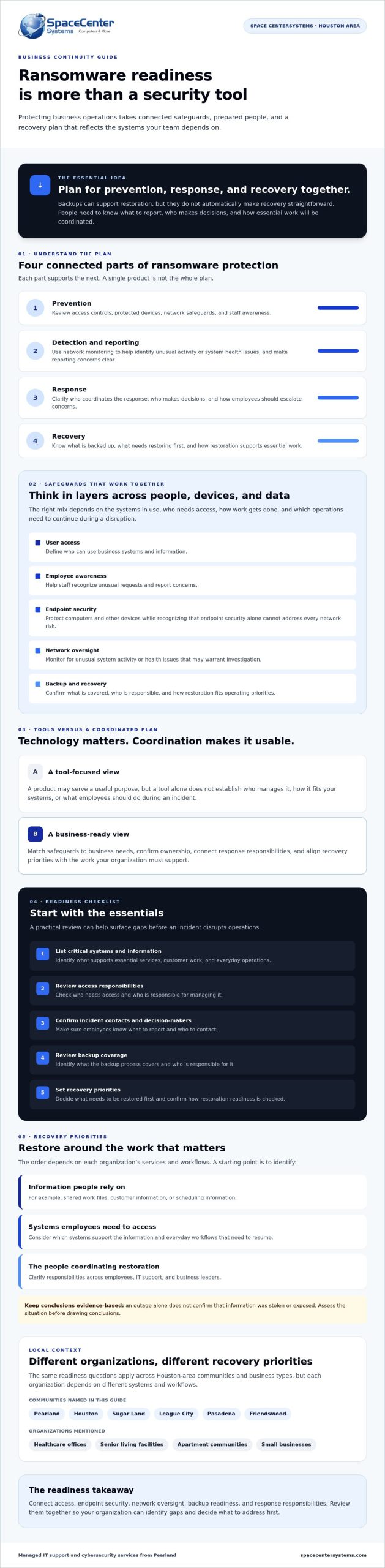
Ransomware protection combines prevention, detection, response, and recovery. It aims to reduce the chance that malicious software will disrupt business systems and prepare the organization to respond if it does. Ransomware can make files or systems inaccessible, often by encrypting data. What is ransomware offers a broader overview of how these attacks work. Ransomware protection Houston businesses can use should account for both technology and the work that technology supports.
That means looking beyond an individual security tool. Access controls, protected devices, network oversight, backup and recovery, and clear response steps all have a role. SpaceCenter Systems provides Houston IT services from Pearland, helping local organizations consider cybersecurity and business continuity together.
How ransomware can disrupt everyday business operations
Imagine a small Houston office arriving to find that a shared folder containing schedules and customer records is unavailable. Staff may be unable to confirm appointments, answer routine questions, or complete work that depends on those files. If other systems are affected, more departments may be disrupted, and recovery priorities may change.
An outage alone does not confirm that information was stolen or exposed. The situation needs to be assessed before conclusions are drawn. The impact also depends on how the organization operates. A healthcare office, an apartment community, and a small professional services firm may rely on different systems and have different priorities for restoring work.
Why prevention and recovery belong in one plan
Safeguards work together. Secure access, endpoint protection, network monitoring, and staff reporting procedures can help reduce exposure and support timely investigation. None guarantees that an incident won’t happen. Planning should also clarify what employees should report, who coordinates the response, and which systems the business needs to address first.
Ransomware readiness includes prevention, response, and recovery. Backups are part of that plan because they can support restoration of important business information after a disruption. Their presence alone isn’t enough. Identify what information is backed up, which operations depend on it, and how recovery fits into business continuity. A coordinated plan gives employees and IT support a shared path forward rather than leaving recovery decisions until systems are unavailable.
How layered ransomware protection works across a business network
Ransomware protection Houston businesses plan should reflect how people, devices, applications, and data connect. A useful approach combines safeguards instead of relying on one product. The right mix depends on the systems in use, who needs access, how work gets done, and which operations need to continue during a disruption.
Connect user access, endpoint security, and network oversight
Access management defines who can use business systems and information. Employee awareness supports that work by helping staff recognize unusual requests and report concerns. Endpoint security adds protection on computers and other devices, but it can’t address every risk across a business network on its own.
Network monitoring can help identify unusual system activity or health issues that warrant investigation. It works alongside access safeguards, protected endpoints, and a clear process for escalating concerns. CISA’s ransomware readiness checklist offers additional guidance for reviewing prevention and response planning.
Make backup and recovery part of the protection strategy
Set backup priorities by identifying the information and systems that support essential work. A business might prioritize shared work files, customer or scheduling information, and the systems employees need to access them. The right order depends on the organization’s services and workflows.
Having backups doesn’t show by itself that important information can be restored when needed. Confirm what the backup process covers, who is responsible for it, and how recovery fits into operating priorities. Explore business backup solutions as part of a broader recovery discussion, not as a substitute for planning.
Connected stages: Prevention → Detection → Containment → Recovery
Prevention reduces exposure; detection prompts investigation; containment limits the spread of a disruption; recovery focuses on restoring prioritized systems and information. These stages connect, but each requires defined responsibilities and practical steps.
For example, a Houston office might depend on shared files, business phones, and scheduling software to serve customers. Its plan should account for which systems rely on one another, who can approve recovery decisions, and what employees should do if a device or file becomes unavailable. Those details make layered protection relevant to everyday operations rather than a generic technology checklist.
If your organization needs help evaluating how system oversight fits into its safeguards, include network monitoring in a broader assessment of network security and recovery readiness.
Ransomware protection tools versus a coordinated business plan
A security product can address a specific risk, but buying one tool doesn’t complete a business’s ransomware protection. Endpoint software, for example, focuses on devices. It doesn’t define who reviews alerts, how staff report a concern, which systems take priority, or how the business will restore important information.
For ransomware protection Houston organizations should assess how their tools connect with the people responsible for using them. The National Institute of Standards and Technology’s coordinated business plan guidance offers a broader framework for managing ransomware risk than any single product can provide.
What endpoint protection can and cannot address
Endpoint protection is one layer for devices such as employee computers. Its role depends on the tool and how it’s configured, so ask what kinds of alerts it generates, who reviews them, and how concerns are escalated. A tool may identify a potential issue, but people still need an agreed process to investigate it, coordinate a response, and make operational decisions. Tool coverage and incident readiness are related, but they aren’t the same.
Questions to assess whether protection is joined up
Use questions like these to understand how each capability fits into day-to-day operations:
| Capability | Business purpose | Questions to ask an IT provider |
|---|---|---|
| Endpoint protection | Help safeguard employee devices and surface potential concerns. | Who reviews alerts, and how are they escalated? |
| Access management | Align system access with employee roles and business needs. | How is access reviewed when roles or responsibilities change? |
| Network oversight | Help identify system activity or health issues for investigation. | Who assesses an unusual issue and coordinates next steps? |
| Backup and recovery | Support restoration of prioritized business information and systems. | Which files and systems are covered, and how is restoration checked? |
| Response planning | Clarify roles and priorities during a disruption. | Who coordinates the technical response, and who makes business decisions? |
A security product cannot replace tested recovery and response planning. A useful review connects alert handling to decision-making, identifies which business files and systems are covered by backups, and checks how restoration readiness is assessed. It should also clarify who coordinates technical work and how employees know what to report.
SpaceCenter Systems provides cybersecurity assessments for Houston-area organizations. A review can help identify where tools, backup readiness, and response responsibilities need better alignment. No plan can guarantee that an incident won’t occur.
A practical ransomware readiness checklist for Houston organizations
A readiness review turns general concerns into assigned tasks. Use this sequence to record what your organization depends on, who is responsible, and what needs attention. A checklist can help identify gaps, but it can’t prevent an attack on its own.
Review critical systems, access, and recovery priorities
- Inventory systems and information. List the applications, shared files, devices, and operational dependencies employees rely on. Include business phones or scheduling systems if their disruption would affect daily work.
- Review access responsibilities. Identify who administers access to business systems and who approves changes. Note which roles need access to critical information, and document how access changes are handled when responsibilities shift.
- Set recovery priorities. Ask department leads which systems and files their teams need first to resume essential work. Record dependencies, such as an application that relies on a server or shared data, so recovery decisions reflect how the organization operates.
Check backups, response contacts, and business continuity
- Review backup coverage. Confirm which files and systems are included, who is responsible for the backup process, and how restoration readiness is checked. Don’t assume that having backups means every priority system can be restored as needed.
- Document escalation contacts. List who contacts IT support, who informs leadership, and who communicates with employees or other relevant parties. Make responsibilities clear so staff know where to report a suspected issue and leaders know who coordinates next steps.
- Record decisions and keep the plan accessible. Document recovery priorities, assigned owners, and outstanding questions. Store the plan where authorized staff can find it if normal systems are unavailable, and review it when important systems or responsibilities change.
For a Houston-area office, these steps should reflect actual operating needs rather than a generic template. A small professional firm may prioritize shared client files and scheduling, while a healthcare office or apartment community may depend on different systems and workflows. The goal is a practical record that helps employees, leadership, and IT support coordinate.
SpaceCenter Systems supports Houston-area organizations with business continuity and disaster recovery planning. Reviewing your continuity strategies can help you consider how these readiness tasks fit into a broader recovery plan.
Use this checklist to start a ransomware protection Houston readiness review, then assign an owner and next step to each gap you find.
How Houston businesses can strengthen ransomware readiness with local IT support
A cybersecurity review can help business leaders see whether network security, backup readiness, and recovery planning fit together. It isn’t a guarantee against ransomware. It’s a practical way to identify gaps, clarify responsibilities, and decide what to address first.
SpaceCenter Systems is based in Pearland and supports organizations across the Houston area, including Pearland, Houston, Sugar Land, League City, Pasadena, and Friendswood. Its Houston IT services include cybersecurity assessments, network security, backup and disaster recovery, and business continuity support.
What to expect from a business cybersecurity review
Bring a clear picture of your current systems, the work that depends on them, and your main recovery concerns. A review can consider how employees access systems, how network security is managed, which important information is included in backups, and how your organization would coordinate recovery. The findings can help decision-makers prioritize practical next steps instead of treating every potential gap as equally urgent.
SpaceCenter Systems describes its cybersecurity services for businesses, and its IT needs assessment program offers more information about the assessment process.
Choose a response and recovery path that fits your organization
Managed IT, network security, and backup planning can support a coordinated approach when they align with business responsibilities and recovery priorities. The right plan depends on what your organization does. A healthcare office may prioritize systems that support patient services, while a senior living facility or apartment community may have different operational dependencies and information to protect.
Discuss who reviews concerns, who coordinates the technical response, and which operations need to resume first. A local provider can help you evaluate those questions and identify practical areas for review, without promising that an incident can always be prevented or every system restored without disruption.
Build a More Confident Ransomware Readiness Plan
Effective ransomware protection Houston businesses can build relies on coordinated safeguards, recovery planning, and clear responsibilities. A security tool can support prevention or detection, but readiness also means knowing which systems matter most, who responds to alerts, and whether essential information can be restored.
Start by reviewing network security, backup readiness, and business continuity together. Document recovery priorities and make sure the people responsible for technology and operations understand their roles. These steps can help your organization identify practical gaps without assuming that any safeguard can prevent every incident.
SpaceCenter Systems supports Houston-area organizations from its base in Pearland, with cybersecurity, network security, backup, and business continuity services. A focused IT assessment can help you understand how these areas fit your systems and operating needs.
For businesses in Pearland, Houston, Sugar Land, League City, Pasadena, and Friendswood, a practical next step is to review your current readiness with a local provider.
Frequently Asked Questions
What is the most effective way to protect a business from ransomware?
There’s no single control that guarantees protection. Effective ransomware protection Houston businesses can build combines safeguards for user access, endpoints, networks, backups, and incident response. Start by listing critical systems and reviewing who can access them. Then confirm backup coverage and recovery procedures, assign response contacts, and clarify who makes operational decisions during an incident. A cybersecurity assessment can help identify gaps based on your organization’s systems and daily needs.
Can backups protect a business from ransomware?
Backups can support recovery, but they don’t prevent an attack or prove that restoration will work. Review which important files and systems are covered, who owns the backup process, and how restoration readiness is checked. Then document which systems the business needs to restore first. For example, an office may prioritize shared work files and the applications employees rely on to serve customers. Confirm the details with your IT provider.
How do I know if my business is prepared for a ransomware incident?
Your business is better prepared when it has an up-to-date inventory of critical systems, clear IT escalation contacts, documented recovery priorities, and backups with a known restoration process. Confirm who makes operational decisions if systems become unavailable, too. If employees don’t know whom to contact or leaders aren’t sure what should be restored first, a cybersecurity review can help uncover practical gaps and prioritize next steps.
Does antivirus software stop ransomware?
Antivirus or other endpoint protection can contribute to security, but it isn’t a complete ransomware strategy or a guarantee against an incident. Businesses should also review user access, network oversight, backup coverage, and response planning. Ask your IT provider what your endpoint tools cover, who reviews alerts, how concerns are escalated, and how those procedures connect with backup and recovery plans. That gives you a clearer view of protection beyond the device itself.
What should a business do first if ransomware is suspected?
Follow your organization’s incident process and promptly contact its designated IT or cybersecurity support. Avoid unplanned changes to affected systems unless qualified support directs them, since they could complicate investigation or recovery. The response team can assess the situation, coordinate technical next steps, and help keep business leadership informed. Prepare contact details, decision-making responsibilities, and employee reporting instructions before an incident so people aren’t left guessing under pressure.
Can a small Houston business manage ransomware protection internally?
Some small businesses manage parts of cybersecurity internally, but the right approach depends on the team’s expertise, systems, and operating needs. A local IT provider can review network security, backup readiness, and response planning to help identify gaps and clarify which responsibilities fit the internal team. Businesses in Houston, Pearland, Sugar Land, League City, Pasadena, and Friendswood can use an assessment to guide those decisions without assuming every task must be outsourced.
How often should a business review its ransomware readiness?
Review readiness when systems, staff responsibilities, business operations, or IT providers change, and set a regular review schedule that fits your organization. Revisit backup coverage, critical-system priorities, escalation contacts, and recovery procedures. Make sure the people responsible understand their roles and can locate the plan. Keeping these details current is more useful than relying on an old document that no longer reflects how the business works.