

What if the right IT partner isn’t the one with the longest service list, but the one that helps keep your team’s work moving? Choosing IT support for businesses in The Woodlands TX starts with identifying where recurring technology issues disrupt staff, customer service, and daily operations. A support model should fit how your business works, not just look comprehensive on paper.
Comparing providers can be difficult when support scope, cybersecurity, backups, recovery, and onboarding are described differently. Switching can also feel risky if you don’t know how systems will be assessed, how issues will be escalated, or what your team needs to prepare. Those details matter as much as the service list.
This guide explains how to compare fully managed and co-managed support, assess capabilities that help keep business systems resilient, and plan for implementation. You’ll get a practical way to match support to your internal capacity and identify a useful next step for your business.
Key Takeaways
- Match managed IT support to your business systems, staff needs, and operational priorities.
- Understand how network monitoring, help desk support, cybersecurity, and backup and recovery work together to support continuity.
- Use a consistent comparison framework to assess IT support for businesses in The Woodlands TX, including escalation and project assistance.
- Prepare for a provider transition by listing systems, critical workflows, recurring issues, and support priorities.
- Use an IT assessment to turn operational concerns into a practical support plan tailored to your business.
What IT support for businesses in The Woodlands should actually cover
Choose support by matching its scope to your systems, staff needs, and business priorities. The right IT support for businesses in The Woodlands TX should account for the technology your team relies on and the work that would stop if it failed. A small office using cloud-based tools has different needs from a healthcare practice or a property operation coordinating tenants and vendors.
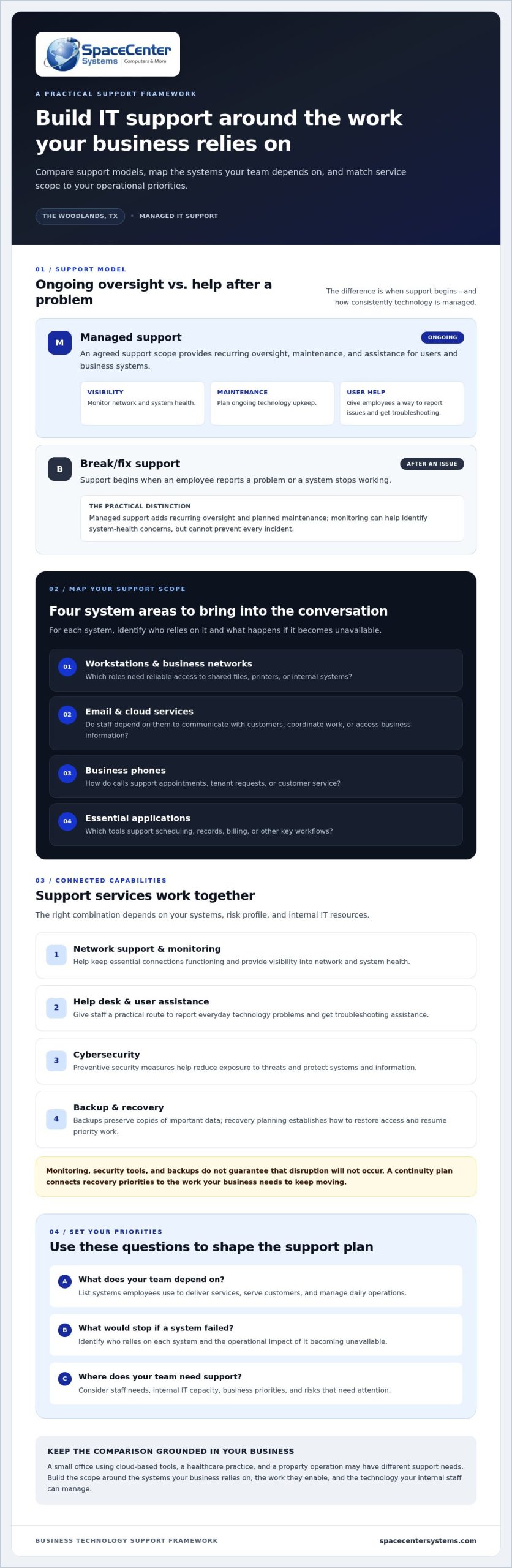
Managed IT support provides ongoing oversight, maintenance, and assistance for users and business systems. Instead of waiting for something to break, a managed services provider (MSP) works within an agreed support scope to maintain technology and address issues. The Managed services model describes this ongoing arrangement, often contrasted with break/fix support, which begins after a problem occurs.
A practical support scope may include network support, help desk assistance, cybersecurity, backup, and recovery. These services address connected needs: network support helps keep essential connections functioning, user assistance helps staff resolve everyday technology problems, and cybersecurity and recovery planning help manage risk and support business continuity. The right combination depends on your systems, risk profile, and internal IT resources.
How managed support differs from calling for help after a problem
Break/fix support begins when an employee reports an issue or a system stops working. Managed support adds recurring oversight and planned maintenance, which can help identify system-health concerns before they interrupt work. Monitoring can’t prevent every incident, but it gives the business a more consistent view of technology condition and helps inform maintenance priorities.
Which business systems belong in the support conversation?
Start with the systems employees use to deliver services, serve customers, and manage daily operations. For each one, identify who relies on it and what happens if it becomes unavailable. Include:
- Workstations and business networks: Which roles need reliable access to shared files, printers, or internal systems?
- Email and cloud services: Do staff use them to communicate with customers, coordinate work, or access business information?
- Business phones: How do calls support appointments, tenant requests, or customer service?
- Essential applications: Which tools support scheduling, records, billing, or other key workflows?
These questions help businesses in The Woodlands and the wider Houston region describe their operational needs without assuming every organization requires the same package. Support can combine remote assistance with on-site work where appropriate. Learn more about on-site and remote IT support.
Build the scope around what your business needs to keep working, where internal staff can manage technology, and which risks need attention. That gives you a useful basis for comparing support models.
How managed IT support protects Woodlands business operations
Managed IT support combines ongoing technology oversight, user assistance, and maintenance to help business systems stay dependable. It doesn’t eliminate every outage or security incident. Instead, it gives a business a consistent way to monitor system health, address issues, manage risk, and plan for recovery. For a business in The Woodlands, that structure can help reduce the chance that technology problems interrupt staff, customer service, or essential workflows.
What network monitoring and help desk support do day to day
Network monitoring provides visibility into network and system health. It can help identify performance concerns or signs that a system needs attention, but it can’t guarantee uninterrupted service. Planned maintenance helps keep technology current and functioning as intended. Help desk support gives employees a practical way to report issues and get troubleshooting assistance.
Support can include remote assistance for issues that can be addressed online, along with on-site work where appropriate. Learn more about on-site and remote IT support and how these approaches can work together.
How cybersecurity, backup, and recovery fit together
Cybersecurity and recovery planning address different parts of operational risk. Preventive security measures help reduce exposure to threats and protect systems and information. Backups preserve copies of important data, while recovery planning establishes how to restore access and resume priority work after data loss or an outage. Neither security tools nor backups guarantee that disruption won’t occur.
For a useful starting point, the Federal Trade Commission offers practical cybersecurity best practices for small businesses. Businesses can apply those principles alongside managed IT support, email security, and other safeguards suited to their systems and risk profile.
Business continuity means keeping essential operations moving during and after a disruption. A continuity plan connects recovery priorities to real business needs. For example, a professional office might prioritize restoring email and shared files, while a property operation may need to restore tenant communications and building-related systems. Documenting these priorities helps clarify what should be recovered first and who needs access.
Backups are most useful as part of a broader recovery process. Identify which information and systems are critical, where backup copies are maintained, and how restoration fits into continuity priorities. Business continuity and disaster recovery planning can turn those priorities into a practical plan. Together, monitoring, user support, cybersecurity, backup, and recovery provide a clearer structure for maintaining operations when technology issues arise.
How to compare IT support providers serving The Woodlands
Compare support against the systems your team depends on, not just the number of services listed. For IT support for businesses in The Woodlands TX, a useful comparison makes clear what’s covered, how support works, and how technology planning connects to your business priorities.
Before reviewing support options, note your essential systems, the workflows they support, who currently manages them, and what a disruption would affect. A healthcare office may prioritize access to practice systems and communications; a property operation may depend on tenant-facing systems and business phones. This baseline helps you judge whether a proposed support plan fits your environment or is too generic.
| Area | What to compare |
|---|---|
| Support scope | Which workstations, networks, email, cloud services, phones, and applications are included? |
| Monitoring | What network or system health information is reviewed, and how are identified concerns handled? |
| Cybersecurity | Which safeguards are covered, and how are security reviews or recommendations addressed? |
| Backup and recovery | What data and systems are included, and how are recovery priorities documented? |
| Escalation | How do employees report issues, and how are unresolved or business-critical problems escalated? |
| Project assistance | How are upgrades, migrations, and other technology changes planned and supported? |
Which questions reveal whether support fits your business?
Look for clear explanations of covered systems, help desk pathways, and escalation steps. Compare how network health is reviewed, how cybersecurity concerns are assessed, and how backups connect to recovery planning. The FTC cybersecurity best practices can provide a useful reference point for discussing safeguards. Documented processes are more informative than broad claims about speed or availability.
Separate clear commitments from marketing language. A nearby office or a claim of fast service doesn’t explain which support tasks are included or how a critical issue moves through escalation. Focus on the process and its relevance to your operations.
How to assess local relevance without relying on proximity claims
Consider whether remote troubleshooting and on-site work fit your team’s actual needs. A business near Hughes Landing, Town Center, or the I-45 corridor may have distinct facilities and workflows, but a landmark alone doesn’t determine support fit. Consider the systems, work locations, and situations that may call for hands-on assistance rather than relying on proximity as a measure of service.
SpaceCenter Systems provides managed IT support, cybersecurity, network monitoring, and help desk services for businesses in the Houston area, including Pearland. An IT assessment is a practical starting point for identifying priorities and shaping a support plan around your business.
What to prepare before changing IT support in The Woodlands
A prepared transition starts with a clear picture of how technology supports daily work. Before changing IT support, gather what you know, note what’s unclear, and identify the systems that need the most attention. This helps turn an initial assessment into a practical plan instead of a generic list of services.
What information helps an IT assessment become useful?
Start with a basic inventory of workstations, servers, network equipment, email, cloud services, business phones, and essential applications. Add your current support arrangements, key vendors, and recurring issues, such as dropped connections or access problems. Perfect documentation isn’t necessary. A useful overview shows what the business relies on and where support is needed.
Then connect each system to the people and processes that use it. Identify teams, work locations, customer-facing responsibilities, and tasks that would be difficult to continue during an outage. Note existing backup practices and which information or systems you’d prioritize for recovery. Include who currently owns decisions or access for each area.
Before comparing IT support for businesses in The Woodlands TX, organize your notes around four steps:
- Inventory systems: List devices, networks, applications, cloud services, and technology vendors.
- Identify critical workflows: Record which systems support essential work and customer service.
- Document recurring issues: Note what happened, who was affected, and how the problem was handled.
- Set priorities: Separate urgent operational concerns from improvements that can be planned over time.
How to plan a measured transition
Use assessment findings to establish a transition sequence that fits your environment. Confirm responsibilities for system access, network and application documentation, vendor coordination, and communication with staff. Give particular attention to continuity for business-critical functions, including how employees will get help and where recovery information is maintained.
Transition steps and milestones depend on your systems, internal resources, and project scope. A business with well-maintained documentation may have different preparation needs from one with several vendors and undocumented dependencies. Agreeing on responsibilities and milestones early helps teams understand what happens next without assuming every transition follows the same timetable.
SpaceCenter Systems provides managed IT services, including network monitoring, help desk support, and infrastructure management. An IT assessment can connect your systems and priorities to a practical support plan.
Choose a Woodlands IT support partner through an assessment
The right IT support partner should fit your operations, cover the systems your staff depends on, address cybersecurity and continuity risks, and explain how a transition will work. An assessment brings these criteria together before you commit. It connects day-to-day concerns with a support plan shaped around your existing environment, rather than a one-size-fits-all package.
SpaceCenter Systems supports organizations across the Greater Houston area. An assessment keeps the conversation focused on your systems, priorities, and internal resources. The goal is to clarify what needs attention and how different support capabilities relate to your work.
What an IT assessment can clarify before you commit
An assessment can help identify network and user-support needs, cybersecurity priorities, backup and recovery considerations, and business continuity requirements. It can also put recurring issues and system dependencies in context. For example, a network concern may affect access to cloud applications, while a backup question may connect to how quickly essential work can resume after data loss.
Findings should lead to practical recommendations that reflect your operations and existing systems. They can help you distinguish immediate priorities from longer-term improvements and define a support scope that aligns with your needs. An assessment doesn’t guarantee a particular result, savings, or implementation timeline. It gives decision-makers a clearer basis for planning.
A practical next step for a Woodlands business
Bring your current pain points, essential workflows, and technology priorities to a conversation. Perfect documentation isn’t required. A clear account of what interrupts work, which systems matter most, and what your team needs from support can make the discussion useful.
A network and IT consultation with SpaceCenter Systems can help you discuss support needs and operational priorities. Use the conversation to identify what an assessment should examine, from network health and cybersecurity to backup, recovery, and transition needs. This keeps the next step focused on fit, not a generic service checklist.
To turn current IT concerns into a practical plan, schedule an assessment with SpaceCenter Systems.
Make your next IT decision with confidence
The right support plan should fit your operations, not just offer a long list of services. Compare what’s covered across network support, user assistance, cybersecurity, backup and recovery, and project work. Then consider how clearly escalation and transition steps are explained. An assessment can connect those details to the systems your staff relies on and the risks that matter to your business.
For IT support for businesses in The Woodlands TX, start with your priorities: recurring issues, critical workflows, internal resources, and the technology that keeps customer service moving. SpaceCenter Systems is a Houston-area business technology provider with more than 25 years of experience supporting organizations. From Houston and Pearland to Sugar Land, League City, Pasadena, and Friendswood, an assessment offers a practical way to turn current concerns into clear next steps without assuming every business needs the same plan.
A thoughtful starting point can make a transition more manageable and help you move toward dependable support that fits the way your business works.
Frequently Asked Questions
What does IT support for businesses in The Woodlands typically include?
IT support typically includes help desk assistance, network support, system monitoring, maintenance, and guidance for business technology. Depending on the support scope, it may also cover cybersecurity, email security, cloud services, backup, and recovery. The right mix depends on the systems your team uses and the work they support. For example, a business phone outage may affect customer calls, while network trouble can interrupt access to shared applications.
How do I choose a managed IT provider for my Woodlands business?
Compare the documented support scope with your systems, staff workflows, and operational risks. Look for clear explanations of help desk pathways, issue escalation, network monitoring, cybersecurity, backup and recovery, and project assistance. An assessment can connect those capabilities to your needs before you decide. SpaceCenter Systems serves Greater Houston organizations, including businesses in Houston, Pearland, Sugar Land, League City, Pasadena, and Friendswood.
Can managed IT support help reduce business downtime?
Managed IT support can help reduce avoidable interruptions through ongoing monitoring, planned maintenance, and practical help desk support. Monitoring provides visibility into system health, while maintenance can address identified concerns before they affect daily work. No approach can prevent every outage or incident. Backup and recovery planning also matter because they help a business define which systems and information are essential and how to prioritize restoration after a disruption.
What should an IT assessment for a small business cover?
An IT assessment should review the systems your business relies on, how they support daily work, and where recurring issues or risks need attention. That can include workstations, networks, email, cloud services, applications, cybersecurity practices, backup arrangements, and recovery priorities. It should also consider your current support setup and internal resources. The findings can help organize concerns into practical priorities without assuming every business needs the same plan.
Is local IT support better than remote IT support?
Neither approach is automatically better. Remote support can address many software, access, and configuration issues, while on-site work may be appropriate when a problem involves physical equipment or infrastructure. The best fit depends on your systems, work locations, and the type of support your operations require. Businesses in The Woodlands can compare how each support method fits their needs rather than relying on proximity alone.
What should I prepare before switching IT support providers?
Prepare a basic inventory of devices, network equipment, applications, cloud services, and technology vendors. Note recurring issues, current support arrangements, business-critical workflows, and who manages system access. Include what you know about backups and recovery priorities. This information helps clarify responsibilities and transition steps. Perfect records aren’t necessary, but identifying documentation gaps can help shape a more practical transition plan.
Does managed IT support include cybersecurity and backup?
Managed IT support can include cybersecurity, backup, and recovery as part of a broader technology support plan. These functions serve different purposes: cybersecurity helps manage risks to systems and information, while backups preserve copies of data and recovery planning helps prioritize restoration after disruption. The specific scope should reflect your environment and business priorities. SpaceCenter Systems provides managed IT support, cybersecurity, backup, and business continuity and disaster recovery services.