

A laptop that freezes during a client call or won’t connect to a business system can bring a workday to a halt. If you’re looking for a laptop fix near me, start by documenting what’s failing and how much your work depends on that device.
When you’re trying to get back to work, it can be difficult to describe a laptop problem clearly. Note what’s happening, when it started, and which tasks are affected. These details help frame the repair discussion. This guide covers what to record, how to prepare a work laptop, and how to choose support that fits the disruption.
SpaceCenter Systems provides computer repair alongside broader business IT support in the Houston area. This guide also explains how to recognize signs that a problem may involve your network or other devices, so you can identify the right scope of support.
Key Takeaways
- Before arranging a laptop fix near me, note what the device is doing, when the issue began, and which work tasks are affected.
- A slow or inaccessible laptop can point to hardware, software, account, or network trouble. Symptoms alone don’t confirm the cause.
- Track whether the problem affects one device or several to help determine whether computer repair or broader IT support is the better fit.
- Prepare useful details for service, including error messages, recent changes, device information, and the urgency of restoring work access.
- SpaceCenter Systems provides computer repair and broader business IT support in the Houston area, connecting device concerns with day-to-day business needs.
Laptop Fix Near Me: What to Do When a Work Laptop Breaks
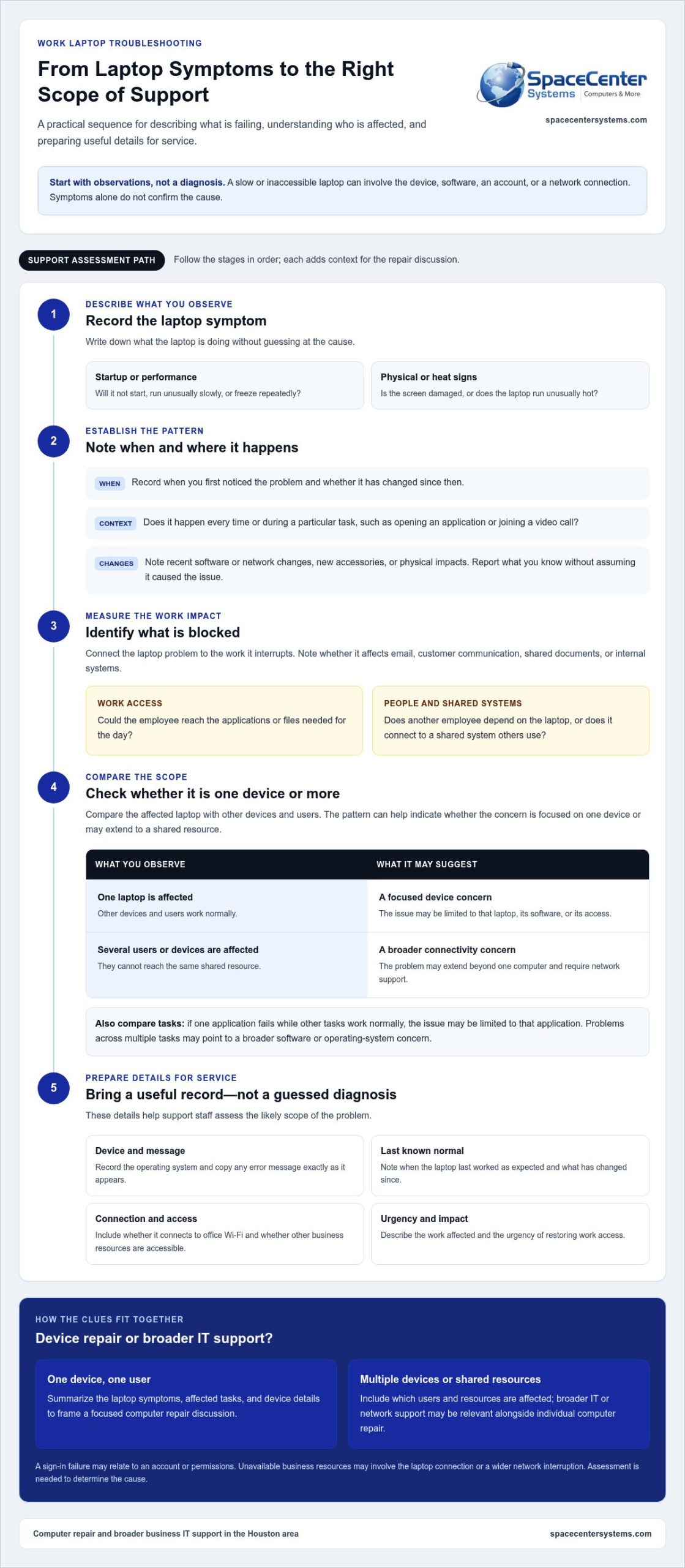
A laptop that won’t start, runs too slowly to use, freezes during a task, or has a damaged screen can interrupt communication and block access to business systems. Before arranging a laptop fix near me, write down what you can observe. Clear details help explain the repair need, but they don’t confirm the cause.
Laptop repair is the process of diagnosing and addressing a fault that affects a laptop’s operation. The issue may involve the device, its software, an account, or a network connection. Describe the symptoms rather than guessing at the cause.
Which laptop symptoms should you describe?
Note what happens and when. A brief, factual record is more useful than a guess about what failed.
- Describe the symptom: Does the laptop fail to start, freeze repeatedly, run unusually hot, or show a damaged screen?
- Record the pattern: Does it happen every time, or only during a particular task, such as opening an application or joining a video call?
- Note when it began: Record when you first noticed the issue and whether it has changed since then.
- List recent changes: Mention software or network changes, new accessories, or physical impacts. Stick to what you know and don’t assume a change caused the fault.
A computer repair technician may work with both hardware and software issues. This Computer repair technician overview provides background on the role. The symptoms you report still need to be assessed rather than treated as a diagnosis.
When does a laptop problem affect business continuity?
Identify which work is blocked. A minor slowdown may be frustrating, while a startup failure can prevent an employee from reaching business applications or files needed for the day. Note whether the problem affects email, customer communication, shared documents, or access to internal systems.
Consider who else depends on the laptop. Does another employee need it to complete a task, or does it connect to a shared system others use? This helps clarify whether the impact is limited to one person or may involve a wider support need.
SpaceCenter Systems provides Houston-area IT support alongside computer repair. Describing both the device symptoms and the work they interrupt puts the repair need in its business context.
How Laptop Problems Are Diagnosed: Software, Hardware, and Network Clues
A laptop can freeze, run slowly, or lose access to a work resource for several reasons. The symptom is a useful clue, not a confirmed diagnosis. A technician considers the pattern, the device, and the surrounding business systems to narrow down possible causes.
Common areas to consider include:
- Hardware: The laptop may have a physical or component issue. A damaged screen or unusual heat is worth reporting, but neither identifies the cause on its own.
- Operating system or application: If one program closes or stops responding while other tasks work normally, the issue may be limited to that application. Problems across multiple tasks may point to a broader software or operating-system concern.
- Account access: A sign-in failure may relate to the user account or permissions rather than a physical laptop fault.
- Network connectivity: If business resources are unavailable, the cause could involve the laptop’s connection or a wider network interruption.
Could the issue be the laptop, an application, or the network?
Compare the affected laptop with other devices. If several employees can’t reach the same shared resource, the problem may extend beyond one computer and require network support. If other devices work and only one laptop is affected, the issue may be limited to that device or its connection.
Notice whether one application is affected or several work tasks. Avoid changing security settings or attempting repairs that could disrupt access. A careful description helps support staff assess the likely scope.
What information helps narrow down a laptop issue?
Record the laptop’s operating system and copy any error message exactly as it appears. Note when the device last worked as expected, what changed since then, and whether the problem happens consistently or under specific conditions. Include whether it connects to office Wi-Fi and whether other business resources are accessible.
This information can help distinguish a device-level symptom from a shared connectivity problem. For background on the wider discussion around repair access, see Britannica’s overview of Right to repair. It introduces the broader topic of repairing technology but doesn’t identify what’s wrong with a specific laptop.
If interruptions affect multiple devices or shared resources, network monitoring support may be relevant alongside individual computer repair. Matching the support to the scope of the issue helps keep the response focused on business operations.
Laptop Repair or Broader IT Support: Choosing the Right Kind of Help
A request for a laptop fix near me may point to a fault with one device, but the right support depends on the pattern and the work affected. Consider how many users are impacted, which tasks are blocked, what access they need, and whether the problem keeps returning. These details help distinguish a focused repair need from a wider business IT issue.
| Pattern | What it may suggest | Useful next step |
|---|---|---|
| One laptop has a problem, while other devices and users work normally | An issue limited to that device, its software, or its access | Summarize the symptoms and business impact when arranging computer repair |
| The same laptop problem returns | A recurring issue that may need a broader look at the device and its work environment | Record when it happens and which tasks are affected |
| Several devices or users experience similar interruptions | A shared connectivity, access, or system issue may be involved | Consider wider IT support, including network or helpdesk support |
When does the problem appear limited to one laptop?
If one employee’s laptop is affected while coworkers can access the same applications and resources, computer repair may be the appropriate starting point. Describe what the device does, when the issue occurs, and which work is delayed. Avoid assuming a hardware failure. Similar symptoms can have different causes, so the device needs to be assessed.
When might the laptop issue point to a wider IT problem?
Look for a shared pattern. Recurring interruptions across devices, several employees losing access at once, or connectivity problems affecting common resources may extend beyond an individual laptop. The business may need network and helpdesk support to address the wider technology context, rather than treating each device as an isolated case.
SpaceCenter Systems provides business helpdesk support, alongside on-site and remote IT support. The number of affected users, the resources they can’t reach, and whether the disruption recurs help clarify the scope. This distinction keeps the response focused, whether the need is computer repair for one device or support for a shared business system.
Before a Laptop Fix: Prepare the Device and Protect Work Access
A little preparation can make a laptop repair discussion clearer and help your business coordinate around the interruption. Before arranging a laptop fix near me, gather information you can observe and follow your organization’s policies for company devices, business data, and account security. Preparation supports an informed assessment, but it can’t guarantee a diagnosis, repair outcome, or timeline.
What should employees document before requesting help?
Write down the device details and what has changed. Include the model and operating system if you know them, the symptoms, and any error messages exactly as they appear. Describe when the issue began, the last time the laptop worked normally, and whether it followed a recent change to software, hardware, or connectivity.
How can a business coordinate repair responsibly?
Identify who owns or manages the device and who can explain the employee’s work priorities. Keep the focus on what the laptop is needed for and which tasks are blocked. Follow internal procedures for business information and account access. Don’t share passwords or bypass security protections.
Use this checklist before arranging service:
- 1. Record the device: Note the model and operating system, using information already available to you.
- 2. Describe the symptoms: State what happens, how often it occurs, and whether it affects one task or several.
- 3. Capture messages: Copy any displayed error text accurately. Don’t guess at what it means.
- 4. Add the timeline: Include when the issue started, the last successful use, and any relevant recent changes.
- 5. Explain the business impact: Identify blocked work, such as access to business applications, files, or communication tools. Note whether other employees or shared systems are affected.
- 6. Follow company procedures: Use your organization’s approved approach for device handling, data protection, and account access. Don’t provide passwords or disable security controls.
Backups and recovery should follow your organization’s approved process. Don’t assume a backup is current or complete, and avoid making an unverified copy of business information. If you’re unsure which steps are appropriate, note the concern for the person coordinating support instead of improvising.
Clear notes help the repair discussion start with the right context. They don’t establish the cause or guarantee data access, a repair outcome, or a particular timeline. Share the documented symptoms, business urgency, and relevant policies when arranging computer repair.
Arrange computer repair support with a concise summary of the issue, its impact, and any relevant error messages.
Local Laptop Repair in Houston: Get Business-Focused Help from SpaceCenter Systems
A work laptop is tied to more than one person’s to-do list. It may provide access to customer communication, shared files, or the business applications an employee needs to keep work moving. SpaceCenter Systems provides computer repair and broader IT support for business environments in the Houston area. The company has served the region since 1995.
Why local context matters for a work laptop
For organizations in Houston and Pearland, a local technology resource can consider a device issue in the context of daily operations. A laptop problem may call for computer repair, while recurring interruptions or issues with shared network access may involve broader IT support. SpaceCenter Systems supports businesses with device repair and services for wider IT needs.
Explore Houston-area IT support to learn more about local business technology services. Whether one employee is blocked or several users are affected, describe the work impact alongside the device symptoms.
What to do next if a laptop is disrupting work
Before reaching out, summarize what the laptop is doing, when the problem began, which tasks are blocked, and whether other employees or devices are affected. Include relevant error messages and recent changes you’ve observed. These details frame the support conversation without assuming the cause or a particular repair outcome.
If the issue appears limited to one laptop, computer repair may be the appropriate starting point. If several people experience similar interruptions, or business applications and network resources are unavailable across devices, broader IT support may better match the scope. SpaceCenter Systems provides managed IT services alongside computer repair, helping businesses address technology needs in the context of their operations.
For a Houston business owner searching for a laptop fix near me, the practical next step is to share the symptoms and explain how the issue affects work. SpaceCenter Systems can discuss the laptop concern and related business technology needs with you.
Keep Work Moving With the Right Laptop Support
A clear account of the symptoms, when they began, and the work they interrupt helps frame the next step. A problem affecting one laptop may call for computer repair, while recurring issues or disruptions across several devices can point to a broader IT support need. Focus on restoring access to the work your business depends on.
For Houston-area businesses, a laptop fix near me can be part of a wider plan to keep employees connected to business applications, files, and communication tools. SpaceCenter Systems provides computer repair and broader business IT support for organizations in Houston and Pearland.
With practical local support, you can take the next step with a clearer picture of the issue and its impact on your team.
Frequently Asked Questions
Where can I get a laptop fixed near me in Houston?
Houston-area businesses can contact SpaceCenter Systems for computer repair and broader business IT support. The company serves organizations in Houston and Pearland, as well as Sugar Land, League City, Pasadena, and Friendswood. Describe what the laptop is doing and how it affects work so the support discussion starts with useful context. SpaceCenter Systems has served the region since 1995.
Can a local IT company fix a business laptop?
Yes. A local IT company that provides computer repair can help address a work laptop issue. SpaceCenter Systems offers computer repair alongside business IT support, so businesses can consider an individual device problem and any related technology concerns together. Share observable symptoms, relevant error messages, and which work tasks are affected. Those details help explain the issue without assuming its cause.
How much does laptop repair cost?
Laptop repair costs depend on the issue, the work involved, and any parts that may be needed. A specific estimate requires understanding the device problem and its scope. For a business laptop, consider the operational impact as well as the repair itself, including which tasks are blocked and whether other staff depend on the device. SpaceCenter Systems can discuss the business laptop issue with you.
How long does it take to fix a laptop?
Repair time depends on the fault and the work required, so it can’t be determined from a symptom alone. The need for parts or further assessment may also affect timing. Explain how urgently the employee needs the laptop, which business tasks are affected, and whether there’s another way to access essential work. Avoid making plans based on an assumed repair timeline.
What should I do before taking a work laptop in for repair?
Record the laptop model and operating system, what happens, when the problem began, and any error message. Note recent changes and the business tasks the device is blocking. Follow your organization’s rules for company devices, information, and account access. Don’t share passwords, disable security protections, or make an unverified backup. Preparation gives the support discussion clearer context, but doesn’t guarantee a diagnosis or outcome.
Should I get a laptop repaired or replace it?
Base the decision on the device’s condition, the issue identified through assessment, and the laptop’s role in your business. Consider the effort needed to restore work access, whether the problem recurs, and how replacement would affect business applications and employee workflow. A symptom alone can’t determine whether repair or replacement makes more sense. An informed decision starts with understanding the fault and business requirements.
Is my laptop problem actually a Wi-Fi or network issue?
It could be, but a connection symptom doesn’t confirm the cause. Check whether other employees or devices can access the same Wi-Fi or business resource. If several users have similar trouble, the issue may involve shared network connectivity. If only one laptop is affected, the cause may be limited to that device or its connection. Record what works and what doesn’t before requesting support.
When should a business seek broader IT support instead of laptop repair?
Consider broader IT support when the same issue recurs, several employees or devices are affected, or users lose access to shared network resources. A problem limited to one laptop may be suited to computer repair, while a shared interruption can involve network or helpdesk needs. SpaceCenter Systems provides computer repair and broader business IT support, helping Houston-area organizations address technology concerns in context.