

Could a recurring slowdown be an early sign of a network issue that may disrupt work across your business? For Houston organizations, network monitoring services can help identify device availability and performance concerns before they become larger interruptions. Visibility alone isn’t enough, though. Alerts need a clear path to review, response, and follow-up.
A slow connection or brief outage might be a one-time glitch, or it could be part of a wider pattern. Monitoring helps answer that question by tracking network health over time. Managed IT support can help investigate issues that need attention. The right approach depends on what your organization needs to see and who is responsible for acting on alerts.
This guide explains what business network monitoring commonly checks, how alert workflows can lead to practical next steps, and how to assess whether managed support fits your Houston-area organization. You’ll also learn what to ask a provider about monitoring coverage, escalation, and the relationship between network support, help desk assistance, and cybersecurity. Use these criteria to make a more informed decision about your network’s visibility and ongoing care.
Key Takeaways
- Learn how network monitoring collects signals and turns alerts into findings your team can review and act on.
- Understand how network monitoring, cybersecurity, and helpdesk support serve different purposes and can work together.
- Use recurring slowdowns, outages, and affected business services to identify what your organization needs monitored.
- When comparing network monitoring services Houston businesses may consider, ask what’s covered, who reviews alerts, and how findings are shared.
- Match monitoring scope and follow-up responsibilities to your business needs, and consider an IT assessment if current visibility is unclear.
What Network Monitoring Services in Houston Help a Business See
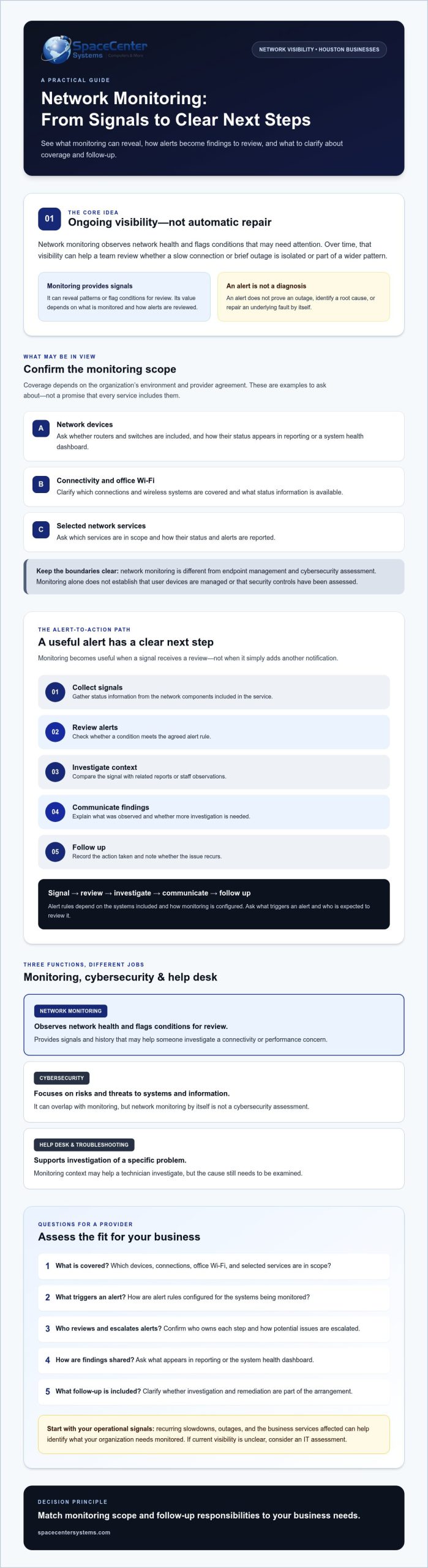
Network monitoring observes network health and flags conditions that may need attention. For a Houston business, that visibility can help determine whether a connectivity concern is isolated or affecting systems staff rely on to serve customers and complete daily work. Network monitoring gives a business an ongoing view of network conditions, so someone can investigate changes that may affect operations.
Monitoring provides signals, not certainty. It can reveal patterns or flag conditions for review, but it doesn’t guarantee that every outage or performance issue will be prevented. Its value depends on what is monitored, how alerts are reviewed, and what follow-up the service includes. For a neutral overview of the concept, see What is network monitoring.
Which parts of a business network may be monitored?
Depending on the organization’s environment and provider agreement, monitoring may cover network devices such as routers and switches, connectivity, office Wi-Fi, or selected network services. These are examples, not a promise that every service includes them. Ask which components are in scope and how their status appears in the provider’s reporting or system health dashboard.
Network health visibility is different from endpoint management and cybersecurity assessment. Endpoint management focuses on individual computers and other user devices. Cybersecurity focuses on risks and threats to systems and information. These areas can overlap, but network monitoring alone doesn’t establish that devices are managed or that security controls have been assessed.
How monitoring differs from troubleshooting
Monitoring is ongoing observation. Troubleshooting is the investigation of a specific problem. If staff report that office Wi-Fi is slow, an alert or history of network conditions may give a technician useful context, such as whether a device or connection showed an issue at the same time. The technician still needs to investigate the cause. An alert identifies something to review; it doesn’t repair an underlying fault by itself.
That distinction helps set clear expectations when evaluating network monitoring services in Houston. Confirm who reviews alerts, how potential issues are escalated, and whether investigation and remediation are part of the arrangement. SpaceCenter Systems provides Houston-area managed IT support that can connect network monitoring with broader troubleshooting. Learn more about its Houston IT services.
How Network Monitoring Detects Issues and Turns Alerts into Action
Monitoring becomes useful when a signal leads to a clear review, not just another notification in an inbox. Alert rules depend on which systems are included and how the provider configures monitoring. A threshold that makes sense for one network may not suit another, so ask what triggers an alert and who is expected to review it.
- Collect signals: Gather status information from the network components included in the service.
- Review alerts: Check whether a condition meets the agreed alert rule.
- Investigate context: Compare the signal with related reports or staff observations.
- Communicate findings: Explain what was observed and whether further investigation is needed.
- Follow up: Record the action taken and note whether the issue recurs.
An alert becomes a support issue when someone reviews its context, confirms what needs attention, and assigns a clear next step. An alert alone isn’t proof of an outage, a cybersecurity incident, or a root cause. For example, a reported connectivity change may need investigation, but it doesn’t establish why the change occurred or whether staff were affected.
What can a network health dashboard help teams review?
A network health dashboard can organize available status and alert information in one view. It may show which systems have reported a condition and whether similar alerts have appeared before. Dashboard content depends on monitoring scope, so confirm what information is available rather than assuming every provider displays the same details.
Readable summaries also help non-technical decision-makers ask practical questions: What changed? Which team or service may be affected? Is follow-up recommended? The Federal Trade Commission’s Cybersecurity guide for businesses discusses monitoring network access as one part of a broader security approach. Network health monitoring and cybersecurity are related, but they aren’t interchangeable.
What should happen after a monitoring alert?
Before selecting a service, ask who reviews alerts, how findings are shared, and which conditions require investigation rather than a routine notification. Clarify whether the provider contacts your designated staff, documents the issue, or recommends another support step. These responsibilities should be defined in the agreement, not left to assumption.
Keep a record of recurring alerts, related staff reports, and agreed follow-up actions. That history can help a technician distinguish a one-time signal from a pattern worth investigating. When comparing network monitoring services in Houston, assess alert ownership and communication alongside monitoring scope. Reviewing the provider’s network monitoring services can help you prepare specific questions about coverage and follow-up.
Network Monitoring vs. Cybersecurity and Helpdesk Support
These services address different questions. Network monitoring provides visibility into network health and observed conditions. Cybersecurity focuses on security risks and protection. Helpdesk support responds to employees who need help with a technology problem. IBM’s overview of network monitoring explains the monitoring function, but monitoring alone doesn’t replace security work or user support.
Network monitoring
Purpose: Observe network status and surface conditions for review.
Typical question: Is a network component or connection reporting an issue?
Cybersecurity
Purpose: Address security risks to systems and information.
Typical question: Could this activity indicate a security concern?
Helpdesk support
Purpose: Respond to employee issues and requests for assistance.
Typical question: What is preventing this person from completing their task?
The services can work together, but they aren’t interchangeable. A slow connection may call for checking network conditions and troubleshooting performance. Suspicious activity needs a security-focused review. A user who can’t access an application may need helpdesk support to check the account, device, or access process. Since symptoms can overlap, the investigation should match the available evidence and business impact.
What network monitoring covers compared with network security
Monitoring shows reported network health and conditions within the agreed scope. Network security addresses risks and protective needs. A monitoring alert may provide useful context for a security review, but it doesn’t confirm malicious activity or establish that security controls are in place. Ask providers to explain where monitoring ends and security assessment or response begins.
When monitoring should connect to helpdesk support
Employee reports add practical context. If an alert coincides with several staff members reporting slow access, support teams can compare those reports with network information and investigate whether the symptoms share a cause. If one person can’t sign in while others work normally, the issue may call for a user-specific review instead.
Repeated connectivity complaints deserve follow-up, especially when they affect the same team, location, or business service. Record when problems occur, who is affected, and what work is interrupted. This information helps support staff assess whether the issue points to a broader network concern or a separate device or access problem.
For Houston organizations, network monitoring services Houston businesses consider should clearly define how monitoring connects with cybersecurity and employee support. Review the provider’s network monitoring services to prepare questions about scope and related support, then confirm which responsibilities are included in the arrangement.
How to Assess Network Monitoring for Your Houston Business
Start with what staff experience, not a tool list. Record recurring outages and slowdowns, when they happen, which teams or locations are affected, and what business services are interrupted. Note whether a connection issue affects one employee, an office area, or systems used by several teams. This baseline helps you explain the problem and evaluate whether a provider’s monitoring scope addresses it.
Questions to ask a prospective monitoring provider
Ask each provider the same questions so you can compare responsibilities, not just features:
- What’s monitored? Ask which network devices, connections, and services are included, and how coverage may vary based on your environment.
- Who reviews alerts? Clarify who decides whether a signal needs investigation and who owns escalation.
- How are findings shared? Ask what gets documented, how updates reach your designated staff, and how recurring issues are reported.
- What happens next? Confirm whether investigation and network troubleshooting are included or handled separately.
- How does monitoring fit broader support? Ask how the service connects with managed IT support and backup and recovery, and where those responsibilities begin and end.
Clear answers prevent gaps between receiving an alert and knowing who will act. Review the service agreement for scope, communication practices, escalation ownership, and limits on follow-up. Don’t assume monitoring automatically includes troubleshooting, cybersecurity response, or backup management.
A practical baseline review for office networks
Build a simple inventory before choosing a service. List known network devices, connectivity dependencies, and recurring support issues. Then identify which staff, locations, and business processes depend on each connection or service. A recurring Wi-Fi problem in one work area, for example, may call for different questions than an interruption affecting a business-critical application across teams.
This information gives a provider a clearer picture of your environment and helps you judge whether network monitoring services Houston businesses are considering align with actual needs. If your inventory is incomplete or recurring issues have no clear cause, a structured IT assessment can help establish a practical starting point. SpaceCenter Systems offers a Houston-area IT needs assessment to review technology priorities.
Use an IT needs assessment to establish a practical starting point for reviewing your network and technology priorities.
Choosing Network Monitoring Services in Houston: A Clear Next Step
The right monitoring arrangement matches what your business needs to see with who is responsible for reviewing findings and following up. A defined scope sets expectations: which network components are included, how alerts are handled, and whether troubleshooting or broader managed IT support is part of the agreement. Local support can also connect technical findings with workplace context, such as which teams or business processes rely on an affected connection.
When Houston-area businesses may benefit from a network review
A review can be useful when connectivity problems recur, alert ownership is unclear, or a network change has left gaps in visibility. Healthcare offices, property managers, and small businesses may depend on different systems and workflows, so the review should reflect how technology supports their daily operations rather than assume one setup fits all.
SpaceCenter Systems provides Houston-area network support and IT assessments. Learn more about its Houston IT services and consider whether a local review could clarify your current network needs. The purpose is to understand the environment and identify questions to address, not to promise that monitoring will prevent every interruption.
What to prepare before an IT assessment
A few practical notes can make an assessment more focused. Gather what you know, even if the inventory isn’t complete:
- A simple overview of network devices, office connectivity, and services your staff depend on.
- Notes on recurring slowdowns or outages, including when they occur and which teams, locations, or business processes are affected.
- A list of current technology providers and a clear view of who handles support, cybersecurity, backup and recovery, and network changes.
- Your business priorities, such as maintaining access to a critical application or improving visibility into recurring connectivity issues.
Use the discussion to clarify what monitoring would cover, who would review and communicate findings, and how the work connects with troubleshooting or other managed IT support. For businesses comparing network monitoring services Houston providers offer, these responsibilities matter as much as the monitoring tools. A practical assessment should define needs and service boundaries before solutions are proposed.
Make Network Visibility a Practical Next Step
Effective monitoring is about more than collecting alerts. It gives your organization a clearer view of network conditions and a defined path for reviewing findings, investigating concerns, and deciding what happens next. The right scope depends on the systems your business relies on and who is responsible for follow-up.
As you compare network monitoring services Houston businesses can consider, focus on three essentials: what’s monitored, how alerts are handled, and how the service connects with troubleshooting and broader IT support. A network review can help clarify recurring issues, business priorities, and gaps in current visibility before you choose an arrangement.
SpaceCenter Systems provides business-focused network support, monitoring, and IT assessments for Houston-area organizations, including Pearland. Founded in 1995, the company brings a local perspective to practical technology needs. An assessment can help your team define questions and priorities without assuming that one solution fits every environment.
With a clearer picture of your network and support responsibilities, your team can decide what to address next.
Frequently Asked Questions
What do network monitoring services do for a business?
Network monitoring services give a business visibility into the health and status of network components included in the service. They can surface conditions for review, helping staff know where to investigate when connectivity or access is affected. The provider’s scope matters: confirm which devices and services are observed, who reviews alerts, and what follow-up is included. Monitoring can help identify issues, but it can’t guarantee every interruption will be prevented.
How does network monitoring work?
Monitoring tools collect status information from selected network components and apply alert rules to identify conditions that may need attention. A provider or designated staff member reviews an alert, investigates its context, communicates relevant findings, and determines the next step. The signals and thresholds depend on the systems being monitored and the service agreement. An alert is a prompt to investigate, not a confirmed diagnosis or an automatic repair.
Can network monitoring prevent business downtime?
Network monitoring may help teams spot potential issues earlier and investigate them before they affect more work, but it can’t prevent all downtime. Equipment faults, connectivity problems, configuration changes, and other issues may still interrupt business services. The practical value comes from matching monitoring scope with clear alert review and follow-up responsibilities. Ask a provider what happens after a condition is detected and which troubleshooting tasks are included in the service.
What is the difference between network monitoring and network security?
Network monitoring focuses on visibility into network health and observed conditions, such as whether included components are reporting an issue. Network security focuses on protecting systems and information from security risks. The services can inform each other, but monitoring alone doesn’t confirm a threat or assess whether security protections are adequate. Ask the provider to explain which responsibilities fall under monitoring, cybersecurity, and any separate security assessment or response.
Does a small business in Houston need network monitoring?
A small business may benefit from monitoring if staff rely on connected systems, recurring slowdowns disrupt work, or no one has time to check network health consistently. The right fit depends on the business’s systems, risk priorities, and available in-house support. SpaceCenter Systems serves local organizations in Houston and Pearland, with geographic targeting that also includes Sugar Land, League City, Pasadena, and Friendswood. A network review can help clarify what visibility is useful.
What should I ask before choosing a network monitoring provider?
Ask which network components and services are monitored, how scope is determined, and who reviews alerts. Clarify how findings are communicated, what triggers escalation, and what gets documented. Confirm whether troubleshooting, cybersecurity, and backup and recovery are included or handled separately. For network monitoring services Houston businesses are considering, these questions help compare responsibilities and service boundaries, not just tools. Ask how the provider will adapt the arrangement if your network or business needs change.